Frequently asked questions
What are the differences between the paid and free versions of the Yandex Maps API?
What services are available in the paid Yandex Maps API?
How do I know if the free version of the API is good for me or if I need to purchase a paid version?
What operations are charged in the JavaScript API?
How are requests calculated for the daily use of the service?
I want to purchase the commercial version of the Yandex Maps API. What should I do?
How do I specify the key in the code?
What happens if I exceed the purchased limit?
Where can I view information about pricing plans and excess charges?
Can I get a test key for the JavaScript API paid version?
Can I get a test key for the commercial version of the Organization Search API?
You specify the price for one year only? Is it possible to pay monthly?
Where can I monitor request statistics? How often are statistics updated?
Can I transfer a key to a different account (for instance, if my employee leaves)?
I forgot the password to the account that the key is registered to. What should I do?
Why doesn't the commercial version support Satellite and Hybrid layers? The free version has them.
Answers
What are the differences between the paid and free versions of the Yandex Maps API?
The differences are as follows::
- The commercial version of the Yandex Maps API doesn't have the free version limitations. For example, commercial version can be used in commercial projects, in applications with limited access or in monitoring systems.
- The "Satellite" and "Hybrid" layers are not available in commercial versions of the JavaScript API and Static API. This is because the license restrictions of data providers don't allow using satellite layers in third-party commercial projects.
- Commercial version doesn't support Internet Explorer 8.
What services are available in the paid Yandex Maps API?
The Yandex Maps API includes several services and libraries: To make the request counting easier, the services are combined in 5 packages:
- JavaScript API and Geocoder HTTP API.
- Organization Search API.
- Static API.
- MapKit SDK.
- Distance Matrix and Retrieving Route Details.
API requests made from different packages are not combined and are charged separately. This means that if you are going to use Geocoder and Organization Search, you will need to choose the pricing plan for each of the packages.
How do I know if the free version of the API is good for me or if I need to purchase a paid version?
Please read the free version's terms of use carefully. If your project doesn't meet at some condition (for example, you will use the Yandex Maps API in the company's internal network), you should buy the commercial version of the API.
What operations are charged in the JavaScript API?
In the JavaScript API, all operations that include requests to the geocoding, routing and panorama search services are charged. For example, adding a placemark by address (that implies using Geocoder) is charged. Adding a placemark by geographic coordinates isn't charged. More information about how requests are counted.
How are requests calculated for the daily use of the service?
For JavaScript API and Geocoder and for MapKit, the total number of requests is calculated with the formula:
+ + Five × .
For the Organization Search API and Static API, requests are calculated in the standard way:
- One HTTP request to the service equals to one request in the limit counter.
The daily request limit for each service is determined by the chosen pricing plan. API requests made from different packages are not combined and are charged separately. This means that if you are going to use Geocoder and Organization Search, you will need to choose the pricing plan for each of the packages.
I want to buy the paid version of the Yandex Maps API. What should I do?
For detailed instructions, see How to purchase a license.
How do I specify the key in the code?
-
Link for accessing the JavaScript API:
https://enterprise.api-maps.yandex.ru/<version number>/?lang=<language ID>&apikey=<API key>&<additional parameters> -
Link for accessing the Geocoder HTTP API:
https://geocode-maps.yandex.ru/1.x/?lang=<language ID>&apikey=<API key>&<additional parameters> -
Link for accessing the Organization Search API:
https://search-maps.yandex.ru/v1/?apikey=<key>&<additional parameters> -
You don't need a key to access the free version of the Static API. Link for accessing the commercial version of the Static API:
https://enterprise.static-maps.yandex.ru/1.x/?key=<API key>&<additional parameters>
I use the same key for different services. Are requests to these services added together or counted separately?
Requests made from different packages are not combined and are charged separately. For example, if you use the same key for accessing Geocoder and the Organization Search API, requests are still counted separately according to the pricing plan you chose for each package.
What happens if I exceed the purchased limit?
Once you reach your daily limit, the service is blocked until the end of the 24-hour period. To learn how to pay the overage charges in advance, see About overage charges.
Where can I view information about pricing plans and excess charges?
You can read about pricing plans in the description of services or in the “Finance” section in the Developer's Dashboard.
Can I get a test key for the JavaScript API paid version?
The commercial version of the JavaScript API includes the same functionality as the free version. To learn more about the API features, use the free version.
Alert
When using the free version of the JavaScript API, you need to consider restrictions.
If you need to test the JavaScript API outside of restrictions (for example, in closed systems), write to us. In your message, specify which project needs a key and for which period. Also specify the expected number of requests to the geocoding, routing and panoramas services. A manager will contact you when your request is handled.
Is there a way to get a test key for the Organization Search API commercial version?
You can try out the Organization Search API with a 14-day trial version. Message us, and we'll send you a key.
Alert
The trial version of the Organization Search API has a limit of 500 requests per day. In addition, you need to meet a number of conditions.
If you need to use a test key in one of the terms (for example, in a closed system), write to us. In your message, provide a description of your project and for what period you need a test key. Also, specify the expected number of the API requests. A manager will contact you when your request is handled.
You specify the price for one year only? Is it possible to pay monthly?
When you purchase a pricing plan, you can only pay for a year.
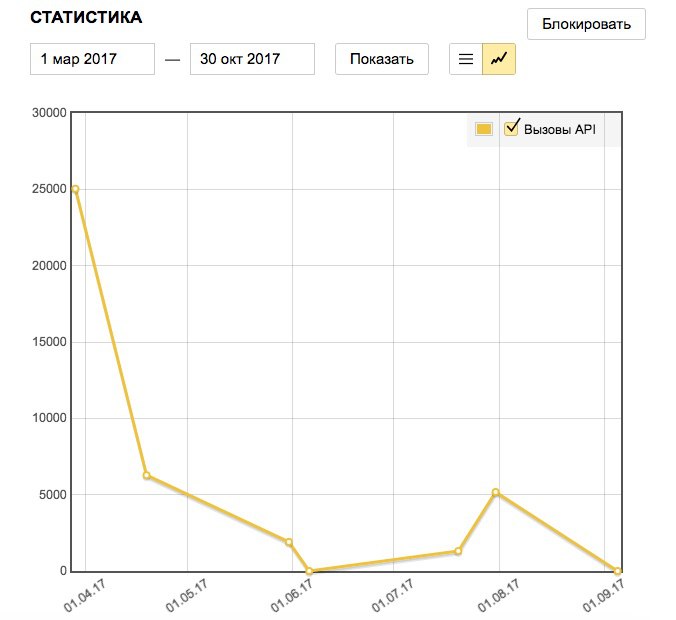
Where can I keep track of request statistics? How often is it updated?
To view the requests statistics:
- Go to the Personal account.
- Choose the key (in the left menu).
- On the right side of the page, enter the day or period you want to get statistics for and click "Show".
The statistics shows both the total number of API requests and the number of requests to individual services (for example, Geocoder, Router, panoramas). Statistics is updated with an hour delay.
Can I transfer my key to another account? For example, if an employee leaves the company.
No, you can't transfer your key to a different account. We recommend that you get the keys for a shared corporate account.
I forgot the password to the account for which the key was registered. What should I do?
Follow the password recovery instructions.
Why does the commercial version not support Satellite and Hybrid map types? The free version has them.
Satellite images are subject to licensing restrictions imposed by data providers. This data cannot be used in third-party commercial products. For this reason, we can't sell this data or access to it. For this reason, Satellite and Hybrid are only available in the free version of the API under the license restrictions.
I use the free Yandex Maps API, but my site/app is getting more traffic. How can I track the number of API requests in order to switch to the commercial version in time?
API request statistics is available on the Keys page on the Developer's Dashboard.
My project doesn't use geocoding, routing or panorama search. How much will a JavaScript API license cost?
In this case, the license for the JavaScript API will cost 120,000 rubles per year.
I have another question
If you can't find an answer to your question, write us through the feedback form. Attach a screenshot if possible. If your question is related to the JavaScript API, provide the code where error occurred. To do this, upload the code to JSFiddle and save it by clicking Save in the upper left corner. Add the resulting link to the description of the problem.