JavaScript API and Geocoder
Limitations of the commercial version
How to get started with the API
Overview
JavaScript API is a software library for working with maps in browsers. It helps you embed on your site a map with toponyms and organizations search, routing, panoramas and other Yandex Maps features.
Geocoder API is an HTTP API that allows to determine the coordinates of objects by their address (and vice versa).
Paid version limitations
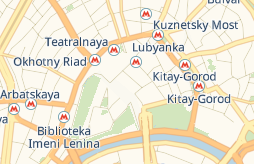
In the commercial version of JavaScript API, only the “schema” layer is available. This is because the license restrictions of data providers do not allow using satellite layers in the third-party commercial projects.
What does the "scheme" layer look like
Licenses and pricing plans
For the “JavaScript API and Geocoder” product, two types of licenses are available: standard and extended. The difference is the following: under the standard license, you aren't allowed to save or edit the data you receive through the API. The advanced license doesn't have this restriction.
The price of licenses depends on the number of requests the site sends to the API. What requests are charged
Alert
Please note that the product license is purchased for a year or a month. You can't make a payment for a different period. Moreover, only prepayment is possible: you can only start using the API after you pay the minimum amount in full.
To get access to the extended license, write to us and tell about your project.
Commercial version
The standard license doesn't allow saving or changing data obtained using the API. If you need this functionality, purchase the advanced license.
Available pricing plans are listed below:
Table 1. Plans with yearly payment and daily overages
|
Maximum number of requests per day |
Base cost/Advanced license (data is preserved) |
Base cost/Basic license |
Price per 1000 requests over the request limit for the base cost |
|
1000 |
226,200 rubles |
195,000 rubles |
390 rubles |
|
10,000 |
678,600 rubles |
585,000 rubles |
195 rubles |
|
25,000 |
1,281,800 rubles |
1,105,000 rubles |
163 rubles |
|
50,000 |
2,210,000 rubles |
1,820,000 rubles |
163 rubles |
|
100,000 |
2,652,000 rubles |
2,184,000 rubles |
163 rubles |
|
200,000 |
3,757,000 rubles |
3,094,000 rubles |
117 rubles |
|
300,000 |
5,226,000 rubles |
4,329,000 rubles |
117 rubles |
|
500,000 |
7,618,000 rubles |
6,305,000 rubles |
117 rubles |
|
1,000,000 |
13,481,000 rubles |
11,050,000 rubles |
59 rubles |
|
Over 1,000,000 |
To calculate costs, send a request to paid-api-maps@yandex-team.ru and tell us how many requests per day you expect. |
To calculate costs, send a request to paid-api-maps@yandex-team.ru and tell us how many requests per day you expect. |
To calculate costs, send a request to paid-api-maps@yandex-team.ru and tell us how many requests per day you expect. |
Table 2. Plans with monthly payment and daily overages
|
Maximum number of requests per day |
Base cost/Basic license |
Price per 1000 requests over the request limit for the base cost |
|
1000 |
20,800 rubles |
390 rubles |
|
10,000 |
58,500 rubles |
195 rubles |
Note
The number of requests over the limit is rounded upwards to the nearest thousand, depending on the selected pricing plan. For example, under the pricing plan with up to 1000 requests per day, 400 requests above the limit are rounded up to 1000. If you exceed the limit multiple times in a month, the overuse charge is calculated for each day separately.
Limits in API
The following limits are set for the “JavaScript API and Geocoder”:
-
Requests per second (RPS): Up to 50. It's calculated as the sum of requests from the client and from the server.
-
Total number of requests per day. The limit is set on using the following services:
Geocoding
Charged operations:
— Accessing the Geocoder HTTP API.
— Calling the geocode() function.
— Getting the user's location via the geolocation.get() function, provided that reverse geocoding is enabled (the 'autoReverseGeocode' option is set totrue).
— Building a route, provided that the points are specified as addresses, as in the example. Each address initiates a separate request to the geocoder.
— Map search though the control.SearchControl element (with any search service provider).The following operations aren't charged:
— Geolocation with reverse geocoding disabled (the 'autoReverseGeocode' option is set tofalse).
Routing
All operations that send a request to the Router are charged for:
— Calling the route() function.
— Creating a multiRouter.MultiRoute class instance.
— Building a route through the control.RouteEditor element.
— Changing the router options that causes re-routing. For example, turning on the traffic jams consideration or changing the routing type.
— Editing a built route: adding, removing and dragging its points *.
* When dragging the route points, requests to the router are sent on the average every 3 seconds if the server response speed is high enough. For the router, you can increase this interval with the dragUpdateInterval option. If necessary, you can disable re-routing when editing the route with the preventDragUpdate option.
Panorama search
Charged operations:
— Calling the panorama.locate() function to search for panoramas in the vicinity of a given point.
— Calling the panorama.createPlayer() function to create a player on the page.
— Calling the panorama.Manager.openPlayer() method to display a player with a Yandex panorama.
The following operations aren't charged:
— Transitions between the linked panoramas inside the open player, for example transitions by the arrows.
— Creating a player with your own panorama.
— Adding panorama layer to the map.
The maximum request limit depends on the chosen pricing plan. For example, in the "up to 1000 requests" pricing plan, you can send up to one thousand requests to the geocoding, routing, and panorama search services. For all requests over the limit, a separate invoice is issued according to the pricing plan. You can view this invoice in the Developer Dashboard in the "Finance" section.
How requests are counted
The number of API requests is calculated using the following formula:
Geocoder requests + Router requests + ** 5** × Panorama requests
Alert
One request to the Panoramas service equals to five requests in the counter. For example, if you are signed up for the "up to 1000 requests" pricing plan and you sent 200 requests to Panoramas, a separate invoice is created for all subsequent requests.
How to get started with the JavaScript API and Geocoder
To use the commercial version of the API:
-
Purchase a license. How to purchase a license
-
Review the documentation for JavaScript API and Geocoder.
-
Connect the API using the link:
JavaScript API:Geocoder:https://enterprise.api-maps.yandex.ru/<version number>/?apikey=<API key>&lang=<language ID>&<additional parameters>https://geocode-maps.yandex.ru/1.x/?apikey=<API key>&lang=<language ID>&<additional parameters>
When dragging the route points, requests to the router are sent on the average every 3 seconds if the server response speed is high enough. For the router, you can increase this interval with the dragUpdateInterval option. If necessary, you can disable re-routing when editing the route with the preventDragUpdate option.