Lesson 3. API access: how to submit a request
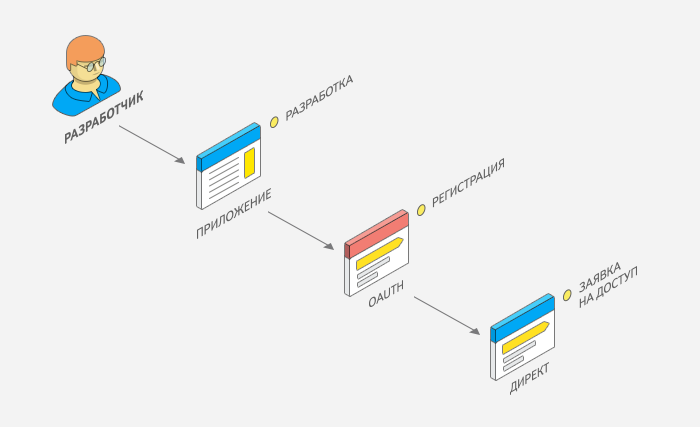
In this lesson, we are going to discuss the second step of enabling your app with access to Yandex Direct API: submitting a request.
Having registered your app with Yandex OAuth, you should submit a request for access to Yandex Direct API. An approved request is mandatory to perform API requests. Having received your request, we will add your app to the Yandex Direct compatible app registry to contact you as its developer: e.g., to notify you of important news or adjustments in your app operation.
Alert
- Only the developer can submit a request for app access (as well as register the app with Yandex OAuth).
- Your app users don't need to do this.
- Please create a single request per each of your apps registered on Yandex OAuth: one app ID — one request for access. Once the request is approved, any number of users can work with the app.
How to submit a request for access
-
Go to Yandex Direct API. If the page is unavailable, set up an account in Yandex Direct.
-
Click Get API access.
-
Accept the user agreement.
-
Go to the My requests tab.
-
Click the New request button.
-
On the request creation form:
-
Select the app ID you have obtained while registering with Yandex OAuth in the previous lesson, from the list.
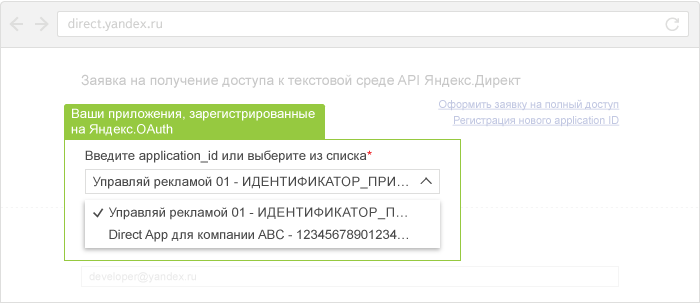
-
Enter an email address you currently use. We will use it to contact you when necessary.
-
Enter your app details in the other fields.
-
Confirm your compliance with the developer's user agreement.
-
Click the Send button.
-
How to find out the result of your request review
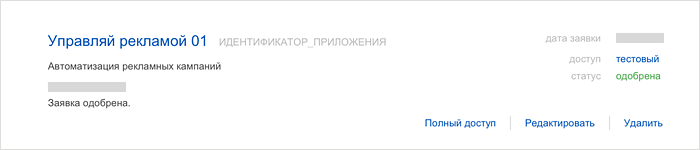
You can view your requests in the Yandex Direct web interface: go to the API section, My requests tab. On the tab you can:
- track the status of your request review; if it is declined, you can see the reasons here
- add, edit, and delete requests.
Request review timeframes
Access requests are reviewed from 10 a.m. to 7 p.m. on business days (excluding holidays in Russia). Request review can take from one hour up to three business days (during peak periods, it can take up to seven days).
What's next
So, you have created a request for access to Yandex Direct API. In the next lesson, you'll learn how to get an OAuth token. You can continue with this tutorial without having to wait until your request review is complete: you will need your approved request only later, when you proceed to making API requests.