Lesson 6. How to get data via the API
In this lesson, you will learn about the API structure and look at some examples of getting data.
Let's remember how objects are linked in the Yandex Direct API (see Lesson 1):
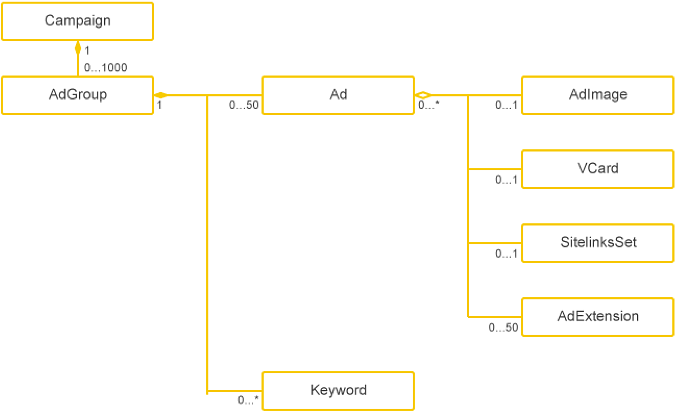
The API provides a service for each object class: Campaigns for managing campaigns, AdGroups for managing ad groups, Ads for managing ads, and others. You can find the full list of services in the documentation.
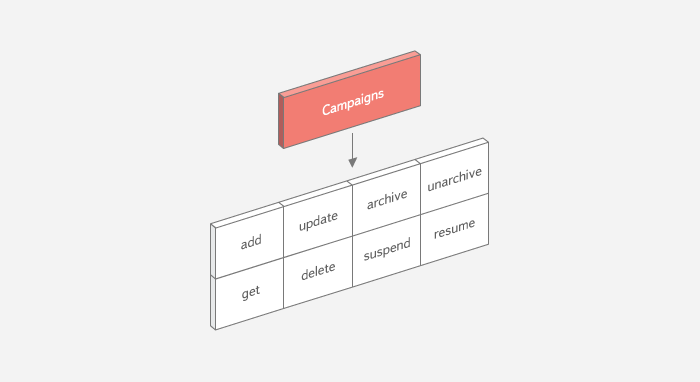
The logic of working with the API objects is unified, with all the service methods assigned standard names. A service typically includes the following methods:
add: Adding objects.update: Changing object parameters.delete: Deleting objects.get: Getting objects.
A service can also have other methods. For example, the Campaigns service provides the following methods:
How to get objects
Let's look at how you can get campaign parameters using the get method.
The get method is designed so that you can request only the data you need. For example, for campaigns you can get their IDs and names only, rather than all their parameters. List the names of the parameters you need in the FieldNames input parameter.
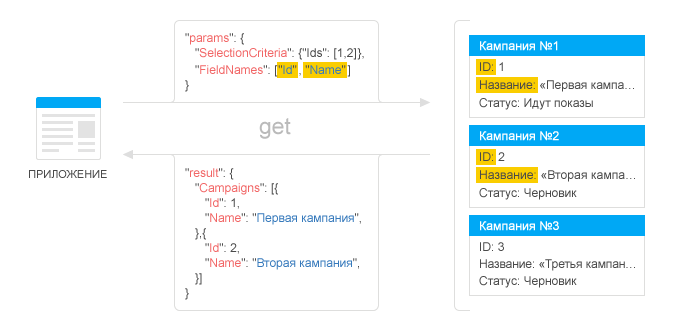
Use the SelectionCriteria input structure to set criteria for selecting objects. If there are several selection criteria, the server searches for objects fitting all the criteria at once. Some services allow you to specify an empty SelectionCriteria structure: in this case, all objects are returned.