Lesson 2. API access: how to register an app in Yandex OAuth
In this lesson, you will learn about the first step of getting access to Yandex Direct API for your app: registering your app in Yandex OAuth. The second step, requesting access, is covered in the next lesson.
In the previous lesson, you created your app developer account in Yandex Direct. Now you need to register your app with Yandex OAuth (you can do this even before creating your app).
What is OAuth authorization and OAuth token?
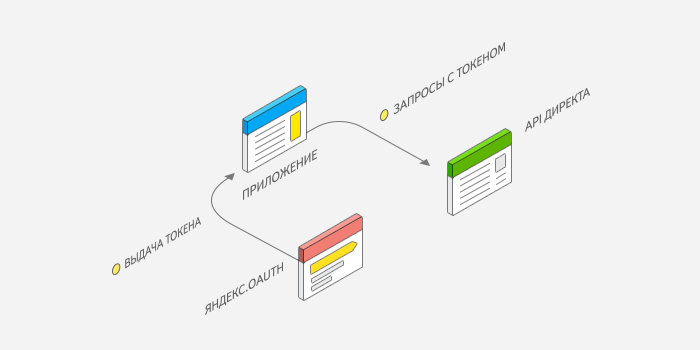
OAuth authorization is a mechanism that allows an application to work with the user data on their behalf without using the account password.
The authorization process uses OAuth tokens which are strings containing encrypted data:
- user ID
- ID of the app allowed to access user data in the service
- set of permissions, i.e., actions permitted to the app.
To work with Yandex Direct API, your application must be registered with Yandex OAuth. After that, the user can allow the app to access their advertising and promotional content, and the app can get an OAuth token. The token must be specified in every API request: this way Yandex Direct can recognize the account the app is accessing and can check permissions for the actions to be done.
Alert
- Each token is unique because it's issued for a specific app-user pair. You can not get two identical tokens or get more than one token for the same app-user pair.
- If an app fails to pass the token in the API request, the server won't allow the app to get or change any data.
How to register an app in Yandex OAuth
Log in to Yandex with your developer username. In Yandex OAuth, open the Create an app page and select For API access or debugging. Fill in the main fields — you can edit all of them later:
-
Service name: Name to display to all users of your service. You can also attach your service icon.
-
Email address: Specify your preferred email address.
-
Data access: Add a data source to manage your ads:
-
Working with Yandex ID organizations (passport:business): Get access to authorization on behalf a Yandex ID organization.
-
Using the Yandex Direct API (direct:api): Get access to managing advertising and promotional content.
Start typing the name and select an option from the list.
-
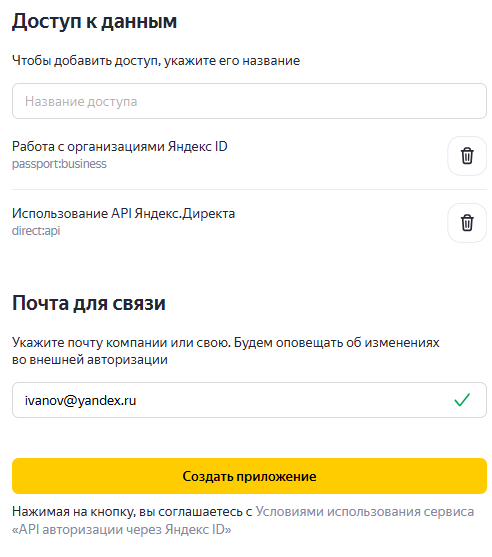
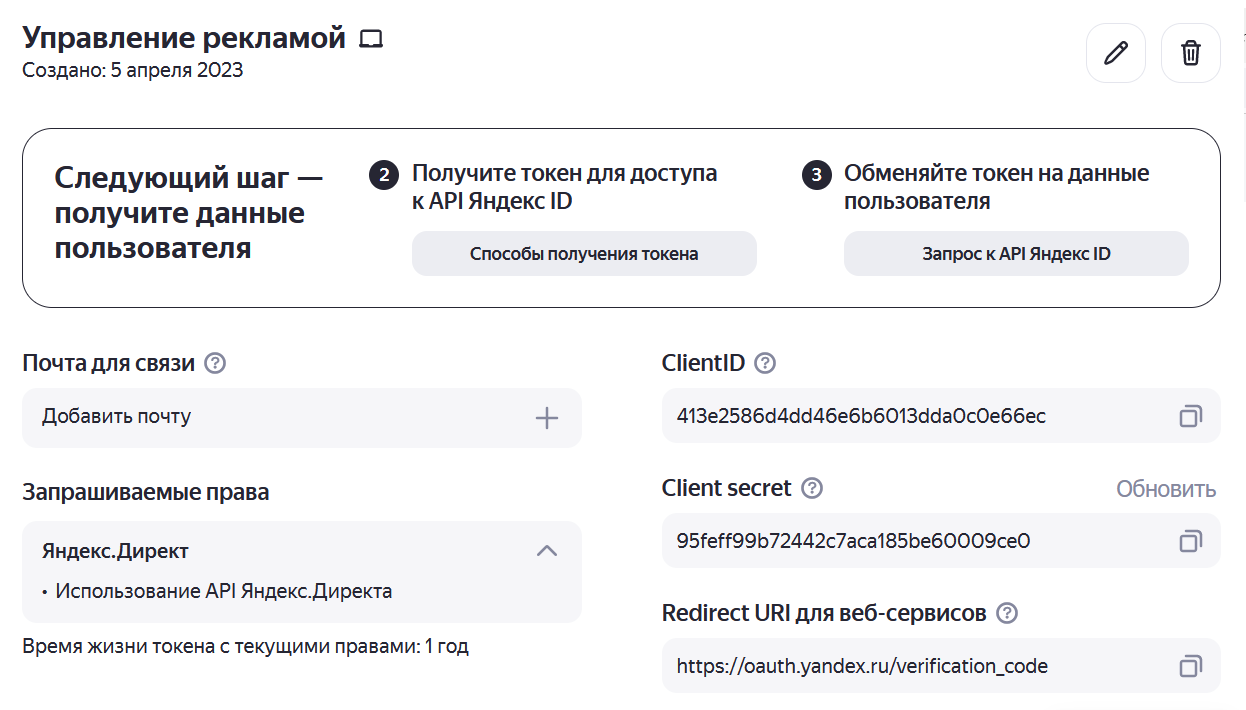
After completing the fields, click Create app. The page will show the ID assigned to the app and the secret that the access token will be signed with. You will need the app ID to fill out the API access application form and to obtain the token. You can look up the ID and other parameters in the Yandex OAuth web interface anytime.
Alert
Only the developer has to register the app with Yandex OAuth. Users of your app do not need to do this, even if each user is working with their own instance (copy) of the app.
What's next
So, you took your first step in getting access to Yandex Direct API: registered your app in Yandex OAuth. In the next lesson, you will learn how to request the API access, and then how to get an OAuth token.
Useful links
- Yandex OAuth documentation: Registering an application