Ready‑made labels-stickers for all boxes in several orders
The method is available for models: FBS, Express and DBS.
If you are using an API Key token, one of the accesses in the list is required to call the method
- inventory-and-order-processing — Order processing and inventory
- inventory-and-order-processing:read-only — View order information
- all-methods — Full account management
- all-methods:read-only — View all data
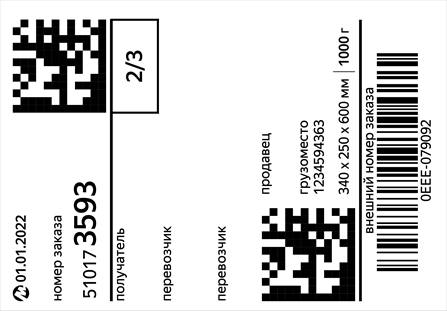
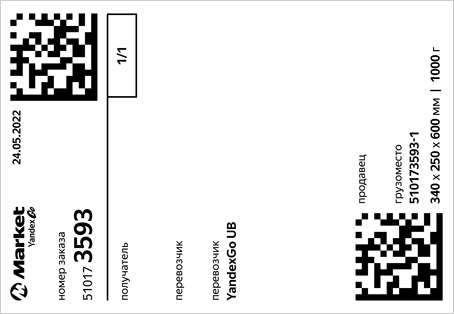
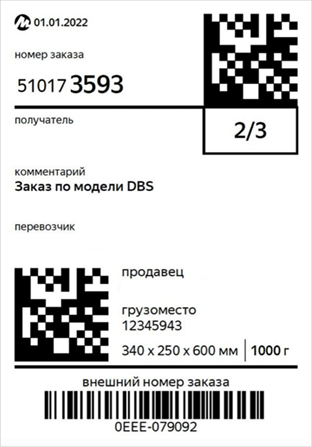
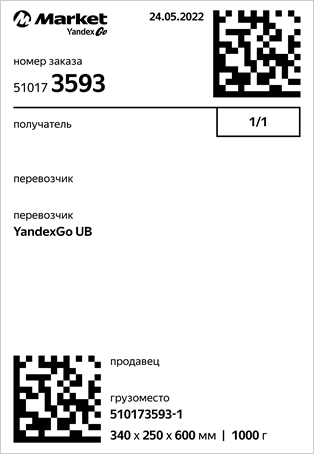
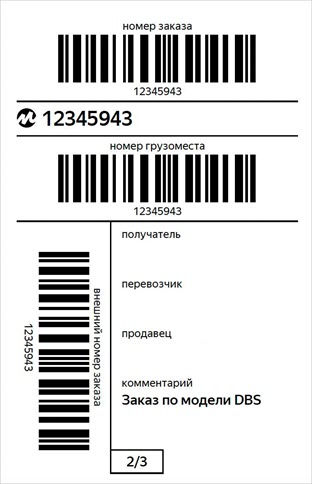
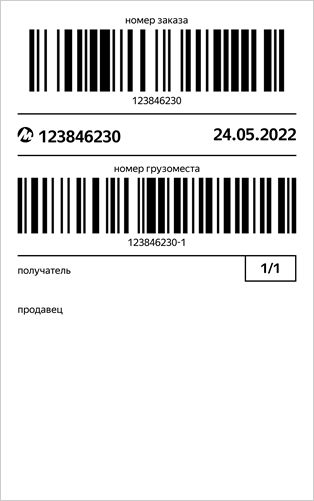
Starts generation PDF-a file with labels for transferred orders. Details about why they are needed and what they look like are described in the Help of the Market for sellers.
To display the external order ID on the label, pass it in the method POST v2/campaigns/{campaignId}/orders/{orderId}/external-id.
You can find out the generation status and get a link to the finished file using a request. GET v2/reports/info/{reportId}.
⚙️ Limit: 1 000 requests per hour |
|---|
Request
POST
https://api.partner.market.yandex.ru/v2/reports/documents/labels/generate
Query parameters
|
Name |
Description |
|
format |
Type: string Setting up the placement of shortcuts on the page. If there is no parameter, it is returned PDF with format labels A7. Placing labels on a page PDF-file:
Enum: |
Body
application/json
{
  "businessId": 1,
  "orderIds": [
    0
  ],
  "sortingType": "SORT_BY_GIVEN_ORDER"
}
|
Name |
Description |
|
businessId |
Type: integer Cabinet ID. To find out, use the request GET v2/campaigns. ℹ️ What is a cabinet and a store on the Market? Min value: |
|
orderIds |
Type: integer[] List of order IDs. Min items: Max items: Unique items: Example |
|
sortingType |
Type: string Label sorting type:
If no parameter is specified, the labels are sorted by creation date. Enum: |
Responses
200 OK
In response, you receive an identifier that allows you to find out the generation status and download the finished file.
If a part of the orders could not be found during the generation, the sub-status will be returned in response to the request to receive the finished file. RESOURCE_NOT_FOUND.
Body
application/json
{
  "status": "OK",
  "result": {
    "reportId": "example",
    "estimatedGenerationTime": 0
  }
}
Type: object
All of 2 types
-
Type: object
status
Type: string
The type of response. Possible values:
OK— There are no errors.ERROR— an error occurred while processing the request.
Enum:
OK,ERRORThe standard wrapper for server responses.
Example
{ "status": "OK" } -
Type: object
result
Type: object
estimatedGenerationTime
Type: integer
Expected generation time in milliseconds.
reportId
Type: string
The ID that will be needed to track the generation status and receive the finished report or document.
Example:
exampleThe ID that will be needed to track the generation status and receive the finished report or document.
Example
{
  "reportId": "example",
  "estimatedGenerationTime": 0
}
Example
{
  "result": {
    "reportId": "example",
    "estimatedGenerationTime": 0
  }
}
400 Bad Request
The request contains incorrect data. More information about the error
Body
application/json
{
  "status": "OK",
  "errors": [
    {
      "code": "example",
      "message": "example"
    }
  ]
}
Type: object
All of 1 type
-
Type: object
All of 2 types
-
Type: object
status
Type: string
The type of response. Possible values:
OK— There are no errors.ERROR— an error occurred while processing the request.
Enum:
OK,ERRORThe standard wrapper for server responses.
Example
{ "status": "OK" } -
Type: object
errors
Type: object[]
code
Type: string
The error code.
Example:
examplemessage
Type: string
Description of the error.
Example:
exampleA list of errors.
Min items:
1Example
[
  {
    "code": "example",
    "message": "example"
  }
]
Example
{
  "errors": [
    {
      "code": "example",
      "message": "example"
    }
  ]
}
A standard wrapper for server errors.
Example
{ "status": "OK", "errors": [ { "code": "example", "message": "example" } ] } -
401 Unauthorized
The authorization data is not specified in the request. More information about the error
Body
application/json
{
  "status": "OK",
  "errors": [
    {
      "code": "example",
      "message": "example"
    }
  ]
}
Type: object
All of 1 type
-
Type: object
All of 2 types
-
Type: object
status
Type: string
The type of response. Possible values:
OK— There are no errors.ERROR— an error occurred while processing the request.
Enum:
OK,ERRORThe standard wrapper for server responses.
Example
{ "status": "OK" } -
Type: object
errors
Type: object[]
code
Type: string
The error code.
Example:
examplemessage
Type: string
Description of the error.
Example:
exampleA list of errors.
Min items:
1Example
[
  {
    "code": "example",
    "message": "example"
  }
]
Example
{
  "errors": [
    {
      "code": "example",
      "message": "example"
    }
  ]
}
A standard wrapper for server errors.
Example
{ "status": "OK", "errors": [ { "code": "example", "message": "example" } ] } -
403 Forbidden
The authorization data is incorrect or access to the resource is prohibited. More information about the error
Body
application/json
{
  "status": "OK",
  "errors": [
    {
      "code": "example",
      "message": "example"
    }
  ]
}
Type: object
All of 1 type
-
Type: object
All of 2 types
-
Type: object
status
Type: string
The type of response. Possible values:
OK— There are no errors.ERROR— an error occurred while processing the request.
Enum:
OK,ERRORThe standard wrapper for server responses.
Example
{ "status": "OK" } -
Type: object
errors
Type: object[]
code
Type: string
The error code.
Example:
examplemessage
Type: string
Description of the error.
Example:
exampleA list of errors.
Min items:
1Example
[
  {
    "code": "example",
    "message": "example"
  }
]
Example
{
  "errors": [
    {
      "code": "example",
      "message": "example"
    }
  ]
}
A standard wrapper for server errors.
Example
{ "status": "OK", "errors": [ { "code": "example", "message": "example" } ] } -
420 Method Failure
The resource access limit has been exceeded. More information about the error
Body
application/json
{
  "status": "OK",
  "errors": [
    {
      "code": "example",
      "message": "example"
    }
  ]
}
Type: object
All of 1 type
-
Type: object
All of 2 types
-
Type: object
status
Type: string
The type of response. Possible values:
OK— There are no errors.ERROR— an error occurred while processing the request.
Enum:
OK,ERRORThe standard wrapper for server responses.
Example
{ "status": "OK" } -
Type: object
errors
Type: object[]
code
Type: string
The error code.
Example:
examplemessage
Type: string
Description of the error.
Example:
exampleA list of errors.
Min items:
1Example
[
  {
    "code": "example",
    "message": "example"
  }
]
Example
{
  "errors": [
    {
      "code": "example",
      "message": "example"
    }
  ]
}
A standard wrapper for server errors.
Example
{ "status": "OK", "errors": [ { "code": "example", "message": "example" } ] } -
500 Internal Server Error
Internal error of the Market. More information about the error
Body
application/json
{
  "status": "OK",
  "errors": [
    {
      "code": "example",
      "message": "example"
    }
  ]
}
Type: object
All of 1 type
-
Type: object
All of 2 types
-
Type: object
status
Type: string
The type of response. Possible values:
OK— There are no errors.ERROR— an error occurred while processing the request.
Enum:
OK,ERRORThe standard wrapper for server responses.
Example
{ "status": "OK" } -
Type: object
errors
Type: object[]
code
Type: string
The error code.
Example:
examplemessage
Type: string
Description of the error.
Example:
exampleA list of errors.
Min items:
1Example
[
  {
    "code": "example",
    "message": "example"
  }
]
Example
{
  "errors": [
    {
      "code": "example",
      "message": "example"
    }
  ]
}
A standard wrapper for server errors.
Example
{ "status": "OK", "errors": [ { "code": "example", "message": "example" } ] } -