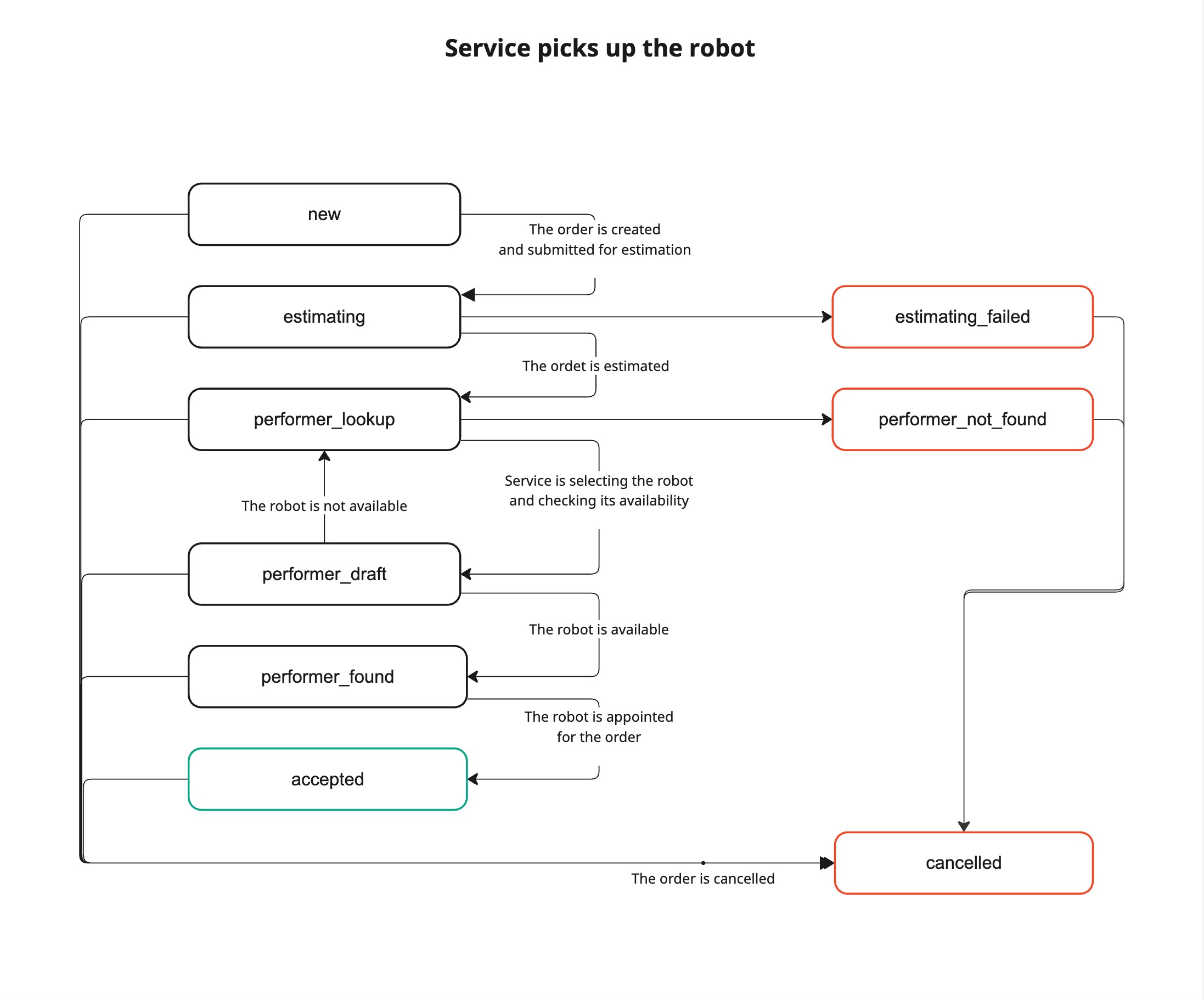
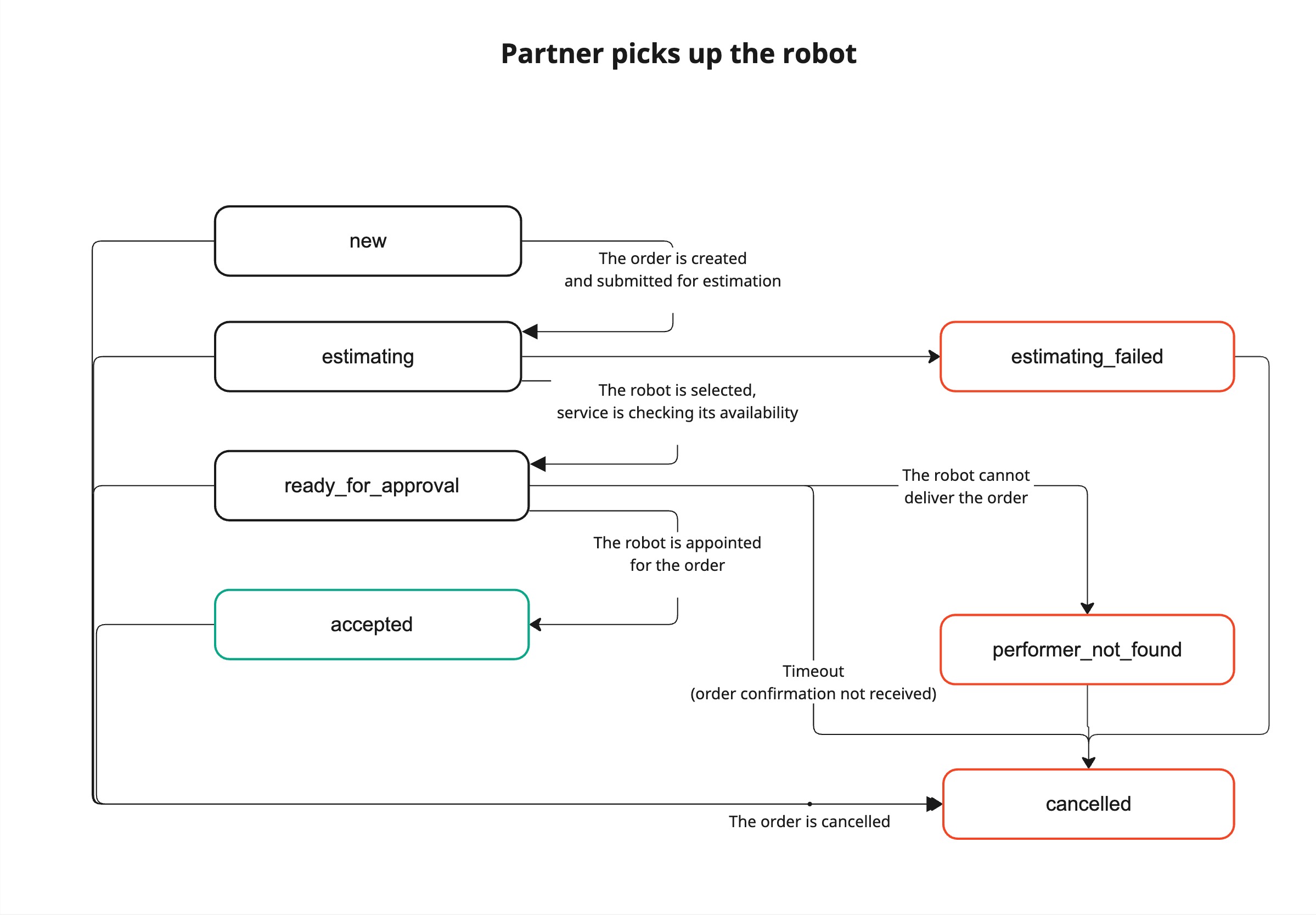
Order creation diagrams
There are two ways of assigning a robot to an order:
The service selects a robot
The partner selects a robot
Order fulfillment diagram
The diagram below shows the order fulfillment process by a rover (Yandex delivery robot).
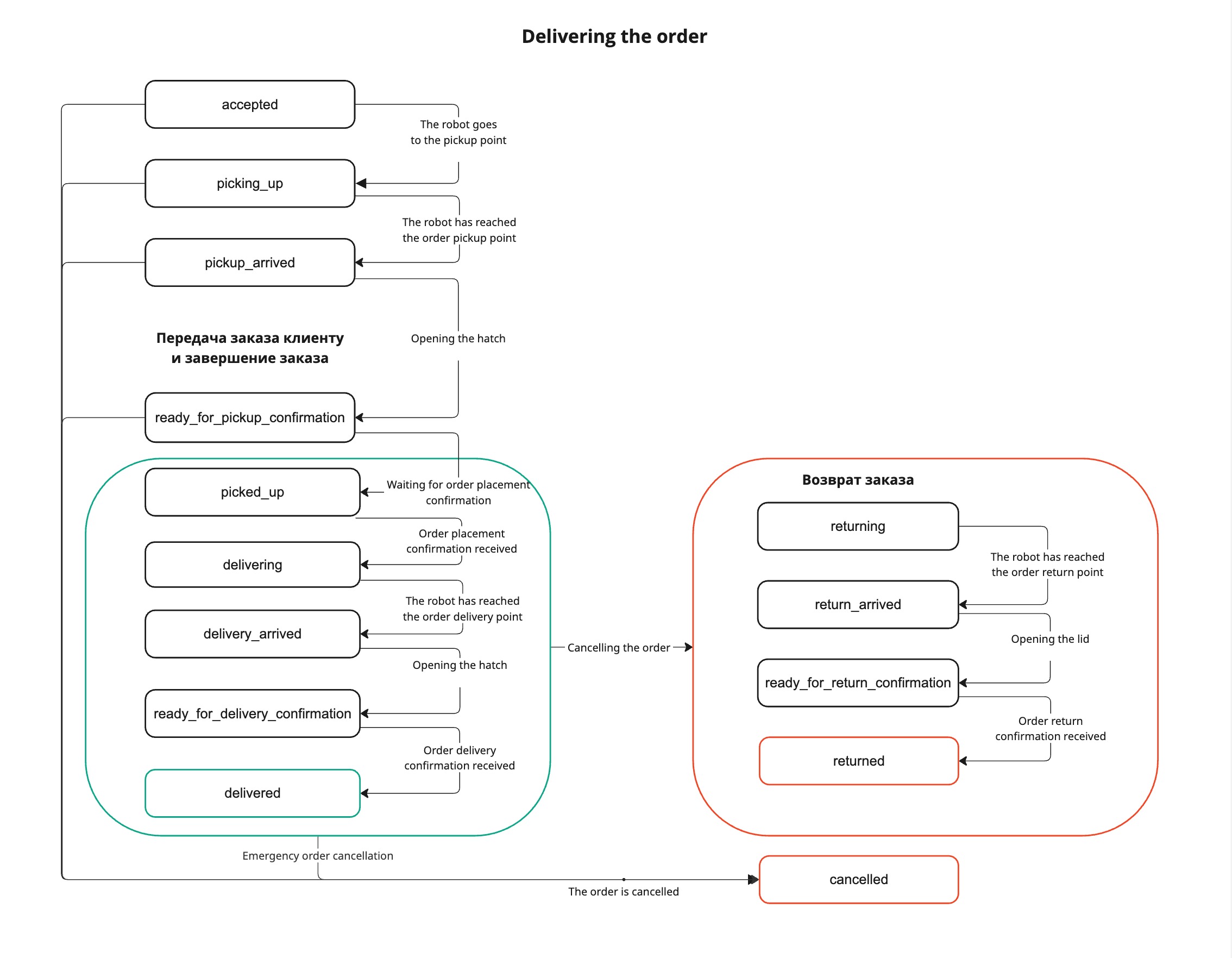
Status description
The 🟢 and 🔴 icons indicate end statuses.
|
Name in the API
|
Order status
|
Basic methods
|
|
new
|
New. The partner has provided information about a new order.
|
Create order
|
|
estimating
|
Evaluation. Order evaluation is in progress.
|
Order information
|
|
estimating_failed
|
Evaluation failed. The order can't be fulfilled.
|
Order information
|
|
ready_for_approval
|
Pending confirmation. The order is pending confirmation by the partner.
|
Order information
|
|
performer_lookup
|
Finding a robot. A robot is chosen to fulfill the order.
|
Order information
|
|
performer_draft
|
Robot found. We found a robot for the order; availability check is in progress.
|
Order information
|
|
performer_found
|
Robot assigned. The order was assigned to the robot.
|
Order information
|
|
performer_not_found
|
Robot not found. No available robot. You can try searching later.
|
Order information
|
|
accepted
|
Order confirmed. The order is confirmed and sent for delivery.
|
Order information
|
|
picking_up
|
The robot is on its way to the store. The robot is on its way to the loading point to pick up the cargo.
|
Order information
|
|
pickup_arrived
|
The robot arrived to pick up the order. The robot arrived at the pickup point and is waiting for the store staff to open the lid and load the cargo.
|
Open lid
|
|
ready_for_pickup_confirmation
|
Pending pickup confirmation. The robot waits for the store staff to confirm that the order was loaded and the lid was closed.
|
Close lid
|
|
picked_up
|
Order placed in the robot. The cargo was placed, and the confirmation was received. The robot starts delivering the cargo.
|
Order information
|
|
delivering
|
Order delivery. The robot transports the cargo from the loading point to the delivery point.
|
Order information
|
|
delivery_arrived
|
Arrived at the destination point. The robot delivered the cargo to the delivery point and is waiting for the customer to open the lid and pick up the cargo.
|
Order information
|
|
ready_for_delivery_confirmation
|
Pending delivery confirmation. The robot waits for the customer to confirm that they picked up the order and closed the lid.
|
Order information
|
|
delivered
|
🟢 Order delivered. The cargo was delivered to the customer. Then the robot returns to the starting point or goes to pick up the next order (if the order is to be picked up from another location).
|
Order information
|
|
returning
|
Returning the order to the store. The customer refused to pick up the cargo, and the robot returns it to the store.
|
Return order
|
|
return_arrived
|
Arrived at the store to return the order. The robot delivered the customer-returned cargo to the store.
|
Order information
|
|
ready_for_return_confirmation
|
Pending order return confirmation. The robot waits for the store staff to confirm that they picked up the cargo and closed the lid.
|
Order information
|
|
returned
|
Order returned. The store staff picked up the returned cargo and closed the lid. Then the robot returns to the starting point or goes to pick up the next order (if the order is to be picked up from another location).
|
Order information
|
|
cancelled
|
🔴 Order canceled. The order was canceled, or an event occurred that stopped the delivery (for example, a robot malfunction).
|
Order information
|
If you didn't find the answer you were looking for, you can use the feedback form to submit your question. Please describe the problem in as much detail as possible. Attach a screenshot if possible.
Contact support