Creation and setup
To run ads in messaging apps, you need to create a new campaign. You can't change your ad placement to a messaging app in existing campaigns.
Step 1. Go to the campaign creation page and set it up
-
Click Add → Campaign.
-
In the Expert mode tab, create a campaign using one of the following methods:
-
Choose Ads in messengers → Select channels automatically.
-
Choose Unified performance campaign. Under Ad placements, select Messengers.
After you save the campaign settings, you will not be able to change the placement.
Unified performance campaigns using messaging apps as placements can't be combined under a portfolio strategy with campaigns that use other placements. You also can't combine campaigns using messaging apps as placements.
-
-
Select the apps where you'd like to run your ads: Telegram, MAX, or both.
You can edit your selected apps after saving the campaign.
-
Select a display strategy:
-
Maximize conversions with a pay-per-click billing model.
This strategy shows your ads on channels with audiences most likely to complete a conversion action on your site. You pay for clicks, and the algorithm automatically optimizes your bids to drive the highest possible number of conversions for your selected goals.
Available limits:
- Weekly budget
- Maximum CPC
In the settings, specify all conversion actions that matter to your business, and set a value for each. If some orders occur offline, upload data on offline conversions.
-
Drive the highest possible number of site sessions. Available limits:
- Weekly budget with an option to set a maximum CPC. The system allocates your budget to generate the maximum number of clicks to your site.
- Average CPC with an option to set a budget. The system automatically sets bids to maintain your chosen average CPC.
-
Step 2. Create an ad group. Specify display regions and how channels should be selected.
-
Under Channel geography, choose the Russian regions you want to target for your ad posts. Channels for the placement will be selected based on the contents of your ads in the context of the selected regions.
For maximum reach, we recommend selecting all of Russia to ensure that your ads will also be served in channels not related to specific regions.
To stop serving ads in the channels of specific regions, we recommend selecting all Russia and adding exceptions.
Channels are mostly not linked to regions. Selecting specific regions might significantly decrease the number of ad impressions, because it will exclude most channels.
For example, your advertising is related to cars:
-
Choosing Russia and disabling Moscow: The ad will be served in the “All about cars” channel, but not in “All about cars in Moscow”.
-
Choosing only Moscow: The ad will be served in “All about cars in Moscow”, but not in “All about cars”.
-
Choosing Russia: The ad will be served in both channels, bringing the maximum number of impressions.
When running ads in messaging apps, you can target region-specific channels and channels with no regional focus — for example, channels about economic news or global cinema. Sometimes, it's crucial for advertisers to address a local audience.
Yandex Direct's algorithms use statistical data about user clicks to check which regions the channel's target audience is from. This helps increase the effectiveness of ads targeted towards local users.
For example, you have created an ad campaign for your car showroom in Moscow and have set the display region as Moscow. Your ad would be shown not only in channels associated with Moscow by name, but also in those where the majority of members are from Moscow.
As a result, ads will be shown only to the audience that can benefit from your ad promotion. This is because most of the channel's subscribers match the selected geotargeting settings, ensuring your target audience sees the ad.
The regular location is determined by the Crypta technology based on clicks by the channel's subscribers.
-
-
Under Channel selection method, the option to serve ads By all relevant categories is selected by default. This way, your ads reach the widest audience.
To adjust your targeting, change the channel selection method:
-
By selected categories
Exclude channel categories where you don't want your ads to appear.
The category is selected by the channel owner when they register in the Yandex Advertising Network. Some categories combine multiple topics to cover broader interests.
List of categories
Business and marketing
Channels about entrepreneurship, business development, startups, market trends, personal and team growth, innovation, and finance.
Blogs
Channels where one or multiple authors regularly share their experiences, observations, and expertise on various topics, ranging from lifestyle to creativity and professional stories.
Videos and movies
Channels that post content about movies, TV shows, and videos, review the latest releases, and talk about the cinema history. These channels also cover film industry figures, behind-the-scenes content, and the technical aspects of filmmaking.
Design and technology
Channels focused on visual and graphic design, technological trends, and innovations. Professionals and amateurs can follow these channels for expertise, news, tutorials, and inspiration.
Food and cooking
Channels sharing recipes, restaurant reviews, cooking techniques, and gastronomic novelties and life hacks. These channels help amateur cooks and professional chefs learn new things, find inspiration, or share their experiences. In addition, this category includes channels focused on healthy eating.
Health, fitness, sports
Channels dedicated to maintaining and improving physical and mental health through sports, fitness, and wellness practices based on modern approaches and professional expertise. This category includes sports fan communities and channels covering sporting events or posting information about upcoming competitions.
Games
Channels posting latest news from the gaming industry, reviews, guides, and esports news. These channels discuss game mechanics and share entertainment and educational content related to video games and the gaming community.
Interior design and construction
Channels dedicated to interior design, architecture, construction, and renovation. They share interior design ideas, case studies, tips, industry news, and inspiring examples for professionals and amateurs.
Careers
Channels that assist readers in finding jobs, developing professionally, and building their career paths. These channels post job listings, self-presentation tips, training materials, and labor market news.
Cryptocurrency
Channels that post industry news and analytics. These channels focus on trading signals, investments, and educational content related to cryptocurrencies, blockchain technology, and digital assets. They serve as a source of relevant information and expertise for traders, investors, and crypto enthusiasts.
Healthcare
Informational and educational channels that share medical news, clinical cases, useful information for doctors and patients, and content aimed at helping specialists with their professional growth.
Fashion and beauty
Channels that focus on fashion trends, style, self-care, makeup, nail art, hairstyles, and other sectors of the beauty and fashion industries. These channels share tips, reviews of new products, life hacks, inspiring content, and expert insights.
Music
Channels dedicated to various music genres and industry trends. These channels share news, posters for music events, reviews of the latest releases, interviews with performers, and educational content for professional musicians and music lovers.
News and media
Channels that cover the latest developments in politics, economics, culture, technology, and other fields. Their readers can find news, reports, interviews, analytics, and exclusive content. Local news also belong to this category.
Informative content
Channels dedicated to psychology, linguistics, books, quotes, or art. They target users seeking to broaden their horizons, improve themselves, and gain a deeper understanding of human culture, language, and mind.
Sales, promos, discounts
Channels that share great deals, sales, promo codes, and special offers from online and offline stores. They help subscribers save money through discounts and the latest promotions.
Travel and nature
Channels dedicated to nature, tourism, summer holidays, ecology, support for animal shelters, and active lifestyles. Subscribers can find inspiration, tips, and travel stories in these channels. This category also includes channels that sell tickets at favorable prices.
Family and children
Channels dedicated to supporting and improving family dynamics, parenting, and children's education. Parents can read them for helpful information on various topics, from child health and psychology to leisure and personal development in specific areas.
Transport
Channels focused on the transportation sector. They post news, research, and content related to the industry's development, logistics, cargo transportation, and the features of different modes of transport. In addition, these channels may provide bus and railway timetables and information about cheap flights. This category also includes channels that discuss traffic rules and offer guidance on choosing auto parts.
Hobbies and self-development
Channels dedicated to courses, guides, psychology, education, and DIY. These channels help users grow personally and acquire new skills in their areas of interest.
Economics and law
Informational and expert channels that analyze financial, economic, and legal topics. In these channels, you can find the latest updates on key economic developments, legislative changes, legal practice, and related recommendations.
Humor and entertainment
Channels that post entertaining and humorous content to lift their readers' spirits, take their mind off daily stress, and foster positive vibes. These channels post jokes, memes, funny stories and videos, satire, parodies, and compilations of interesting facts.
-
By content description
To help the system find channels, describe the topic or type of content your audience might enjoy in your own words. The description must not exceed 200 characters.
Use concise and specific wording — this helps Yandex Direct accurately identify the topic and match your ads with more channels. You can enter multiple descriptions for similar topics, separated by commas, to help algorithms find more relevant channels.
Examples of good descriptions
- Outdoor recreation and nature.
- Product selections from marketplaces.
- Job search and IT vacancies.
- Football channels.
- Movie news.
- Channels about healthy eating.
- Home renovation and decor.
Once you enter a description, the system finds matching channels and shows some of them as a preview of where your ads will run. You can't select or exclude specific channels from this list.
-
-
Calculate the audience forecast in the section to the right of the settings. This will help evaluate how your geotargeting and channel topic settings impact the campaign's reach. The forecast will show these parameters:
- Subscriber reach: An estimated number of unique users who are channel subscribers and meet the given settings for geography and categories.
- Channel reach: The percentage of channels that match the specified geography and category settings out of the total number of channels.
-
Under Adjustments, choose which channel audience characteristics will affect the cost per click. This will optimize your ad impressions by increasing or decreasing the CPC based on audience parameters such as gender, age, and income level. For more information, see Bid adjustments.
-
Tap Continue.
Step 3. Customize your ad and its layout
Alert
You can't edit a published ad post, so be sure to always check your ads before running them.
-
Add a link to the landing page. If you're advertising a channel in a messaging app, create an invite link and add it here.
-
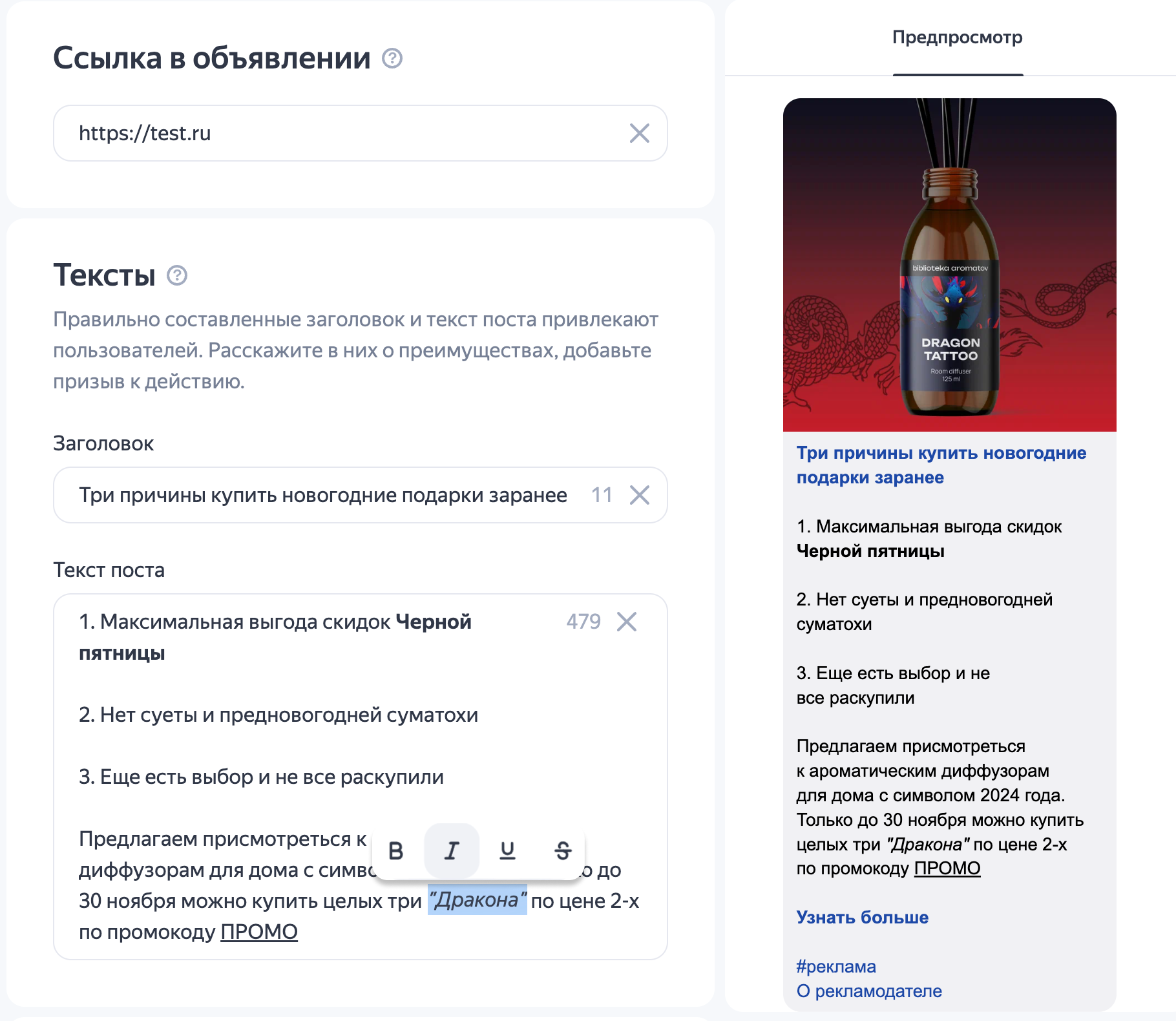
Come up with an ad title and text. Describe your offer and what sets it apart from the competition. An ad title can be up to 56 characters. The maximum text length in an ad is 764 characters. Extra spaces or line breaks might be removed at publication. However, empty paragraphs or spaces between words are not removed.
When creating an ad text, you can split it into paragraphs, add lists, and use formatting. emphasize and accentuate key fragments and focus user attention. To do this, select a text fragment or place the cursor in the Post text section and select from the options in the top menu:
-
Bold
-
Italics
-
Underline
-
Strikethrough
-
Emojis (supported only in “unified performance campaigns”) listed below:
👍😊👌❤️⚡✨🗒✅🏠💰⚽️🏃♂️💻📅📱📞📚📊🎓🚗
Up to 5 emojis per ad are allowed. Each emoji is unique and may take up from 1 to 5 characters in text. Use the character counter to count their number.
You can see what the ad will look like in the preview.
Example of an ad
-
-
To make the ad more appealing and increase its CTR, add up to 10 images to it. You can crop and reorder them in the Yandex Direct interface.
Image requirements
- When the aspect ratio is from 1 : 1 to 3 : 4 or 4 : 3, image size can range between 450 and 5000 pixels on each side.
- When the aspect ratio is 16 : 9, image size can range between 1080 × 607 and 5000 × 2812 pixels.
- The maximum file size is 10 MB.
- Acceptable formats: JPG, PNG.
Use the AI creative editor to generate and edit an image based on your text description.
-
Under Video, add a video or select a video from the gallery. For a better chance of autoplay in your post, add videos up to 10 MB in size.
With the AI creative editor, you can transform images into videos.
-
To motivate users to interact with your ad, add an action button.
-
Before launch, check your ad by using the preview feature. Click Launch campaign.
Questions and answers
How do I view a published ad?
You can view a published ad in one of the following ways:
-
In the Campaigns menu, select the desired campaign and click Campaign statistics. Select By site and specify the period.
-
In the Report Wizard, specify the period and select the Platform name dimension.
The Platform name column in the report displays all channels that served your ad. To view the ad, follow the channel link.
Warning
You can view an ad only for 48 hours after publication. Search for it in channels where it's been posted in the last 48 hours. Older posts aren't available. For this reason, you should generate a report for the current day.
If the channel owner deleted the post, you can no longer see it.
Have questions?
Alert
Our customer support can only assist you with campaigns linked to the username you are contacting us from. You can check your username by opening ya.ru in another browser tab. Our team can access your data only when processing your request.
Scan the QR code or tap it to follow the link.


If you select Telegram or WhatsApp, keep in mind that Yandex does not control and is not liable for how third-party messengers store your data and chat history.