File
To answer this question, you can upload a file. For example, you can add a photo or an error report.
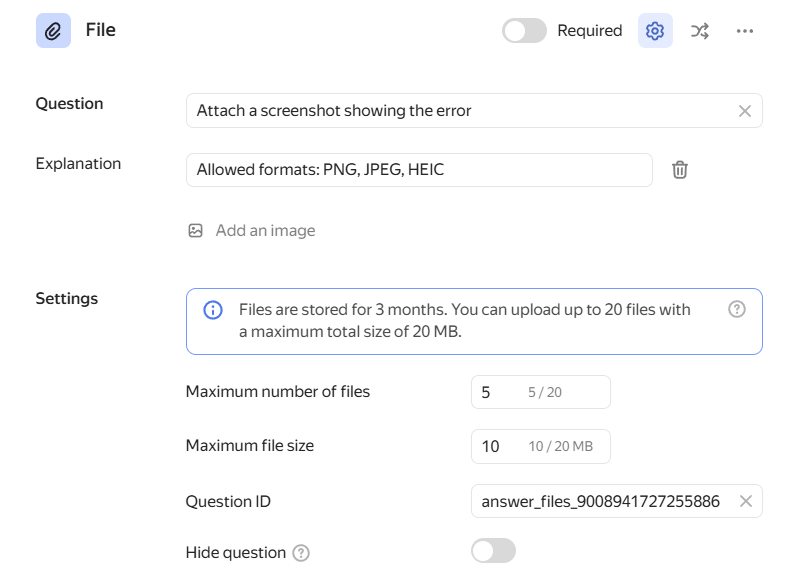
Question
Enter the title of your question.
-
To add a comment or hint to a question, click Add explanation. The text of a comment is displayed using a smaller font size.
To format the text of a question or comment, use Markdown markup.
-
To add an image to the question, click Add image.
-
To make a question required, turn on the Required option in the top right corner of the block.
Required questions are marked with an asterisk (*) in the form. If a user skips a required question, they won't be able to submit the form.
- To show or hide a question based on previous answers, click Display conditions in the top right corner of the block. For more information, see Configure display conditions for questions or pages.
Settings
To reveal additional question settings, click Show settings at the top of the question block. To hide the settings, click the icon again.
Maximum number of files
Users can attach up to 20 files to a single answer. You can set a custom limit below this number.
Maximum file size
By default, the maximum total file size for a single answer is 20 MB. You can set a custom limit below this number.
The service stores attached files for 3 months. After that, the files are deleted and become unavailable for download.
To store more files, connect an external storage. Externally stored files have an unlimited storage period.
Questions IDs
Use the question ID to prefill the form.
Question IDs may contain capital and lowercase Latin letters, numbers, - and _ characters. Make sure all questions in the same form have unique IDs.
Hide question
Enable this option to hide a question in the form. You can use hidden questions to pass service or auxiliary parameters.
Don't select both the Hide question and Required options at the same time. Otherwise, users won't be able to submit the form.