Wiki
To answer this question, you can select data pulled from a Wiki dynamic table. Answers not listed in the table are not accepted.
Data from the dynamic Wiki table is updated every 30 minutes, which is why answer options may be loaded with a delay.
Question
Enter the question title or text.
-
To add a comment or hint to a question, click Add explanation. The text of a comment is displayed using a smaller font size.
To format the text of a question or comment, use Markdown markup.
-
To add an image to the question, click Add image.
-
To make a question required, turn on the Required option in the top right corner of the block.
Required questions are marked with an asterisk (*) in the form. If a user skips a required question, they won't be able to submit the form.
- To show or hide a question based on previous answers, click Display conditions in the top right corner of the block. For more information, see Configure display conditions for questions or pages.
Answers
Multiple answers
Enable this option to allow users to select multiple answer options for a question.
Data type
Use the Wiki value to upload answer options from a dynamic table.
Link to the table
Specify an absolute or relative link to the dynamic table in Wiki. For example:
https://wiki.yandex.com/users/<username>/<page_name>?gridId=<table_ID>
/users/<username>/<page_name>?gridId=<table_ID>
You can copy the link to the dynamic table from the table settings.
For instructions on how to create a table in Wiki, see Table of answer options.
Filter answers
This option loads different answer options based on what the user selected in the previous (parent) Wiki block. To filter answer options:
-
Add another Wiki parent block to the form and enter the link to the dynamic table.
-
In Wiki, create another dynamic table with an additional column for filtering. For more information, see Table with answer filtering.
-
Add another Wiki block to the form and enter the link to the table you created.
-
In the Filter answers list, select the Wiki parent block with the parent table.
Answer options in the second block will vary based on the answer that the user selected in the parent block.
Settings
To reveal additional question settings, click Show settings at the top of the question block. To hide the settings, click the icon again.
Questions IDs
Use the question ID to prefill the form.
Question IDs may contain capital and lowercase Latin letters, numbers, - and _ characters. Make sure all questions in the same form have unique IDs.
Hide question
Enable this option to hide a question in the form. You can use hidden questions to pass service or auxiliary parameters.
Don't select both the Hide question and Required options at the same time. Otherwise, users won't be able to submit the form.
How to create a table in Wiki
Table of answer options
The table of answer options for the Wiki block must use a special format. To create this table:
-
In Wiki, create a dynamic table.
-
Add a column named
nameto the table.
If there are other columns in the table, they will not affect the answer options in the Wiki block. -
Add multiple rows to the table. In the
namecolumn cells, enter answer options that should be selectable in the Wiki block. -
Make sure the service account
yndx-wiki-cnt-robot@has access to the table. This account also has access to the table if Available to all employees mode is on. -
Specify a link to the table in the Wiki block settings.
Table with answer filtering
To create a table with answer filtering:
-
In Wiki, create a dynamic table.
-
Add columns named
nameandparentto the table.
If there are other columns in the table, they will not affect the answer options in the Wiki block and their filtering. -
Add multiple rows to the table. In the
namecolumn cells, enter answer options that should be selectable in the Wiki block. -
Link each answer option to a row in the parent table, which is the table specified in the parent Wiki block settings. To do so, go to the
parentcolumn and specify the row number in the parent table that should load the answer in the Wiki block with filtering.
For example, if the user selects an answer from row number1, in the parent block, answer options that have1specified in theparentcolumn are available in the block with filtering.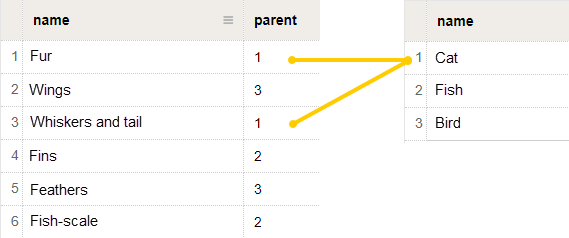
-
Make sure the service account
yndx-wiki-cnt-robot@has access to the table. This account also has access to the table if Available to all employees mode is on. -
Specify a link to the table in the Wiki block settings and enable answer filtering.