Switching to the Yandex 360 for Business plan
If you pay for Tracker through Yandex Cloud, you can switch to paying as part of the Yandex 360 for Business plan. This can be more cost-effective for organizations that already have one of the paid plans.
Available plans are listed in Yandex 360 for Business Help.
Conditions for switching
To switch to paying for Tracker as part of the Yandex 360 for Business plan, the following conditions must be met:
- Your organization already has a paid Yandex 360 for Business plan without Tracker.
- All users from the Yandex Cloud organization are members of the Yandex 360 for Business organization. This is required to keep data in Tracker linked to employees after the switch.
- SSO is not enabled in the Yandex Cloud organization.
- Only users with Yandex ID accounts are members of the Yandex Cloud organization.
- There is no debt for Tracker payment.
- The connection to Yandex Cloud is set up directly, not through a partner.
Switching to the Yandex 360 for Business plan
If you only use the Yandex 360 for Business organization but still pay for Tracker through the Yandex Cloud billing account, contact Tracker support to move the payment to the Yandex 360 for Business plan. No other steps are required.
The owner or organization administrator must perform all steps to switch to the Yandex 360 for Business plan.
-
Make sure that all conditions for switching are met.
-
Open Tracker and sign in to the organization owner or administrator account.
-
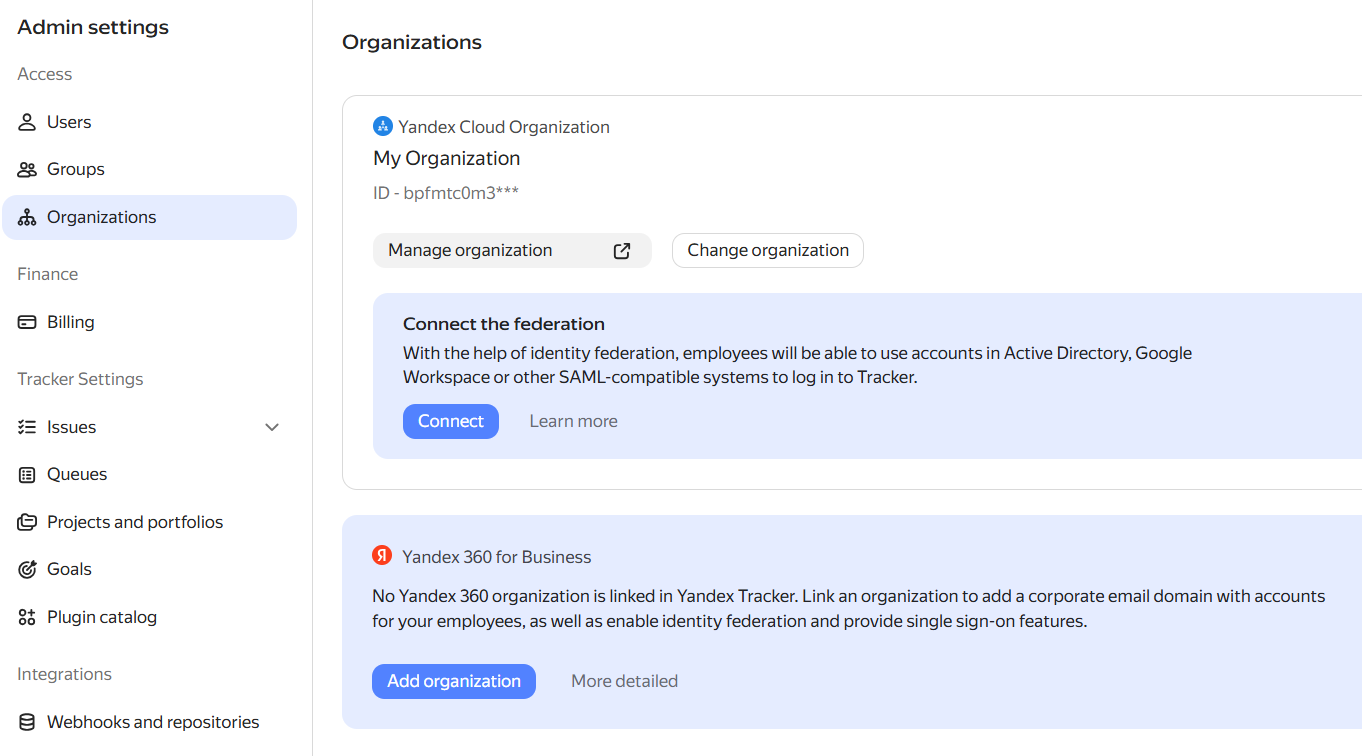
In the left panel, click Administration → Organizations.
-
If the Yandex 360 for Business organization is not yet connected to Tracker, connect it: click Add organization and select the required organization from the list.
-
Make sure that all users from the Yandex Cloud organization are members of Yandex 360 for Business. Add any missing employees before disabling Yandex Cloud, otherwise they will lose access to Tracker as soon as the process is complete.
-
Disconnect the Yandex Cloud organization from Tracker: next to the Yandex Cloud organization, click and select Disable.
-
Contact Tracker support and ask them to unlink the Yandex Cloud billing account from Tracker.
You can submit an unlink request for the billing account on any day of the month. However, the account will only be unlinked after the end of the month.
-
Wait until the end of the month. Make sure that support has unlinked the billing account and subscribe to a plan with Tracker in the Yandex 360 for Business admin console. You can do this starting from the first day of the month following the unlinking of the billing account. For more details, see Yandex 360 for Business Help.
What happens after the switch
- Payment will be charged as part of the Yandex 360 for Business plan.
- The Yandex Cloud billing account will no longer be used for payment.
- Until the plan is enabled, Tracker will operate in Read-only mode.