How to use epics and user stories
In Agile development, tasks are broken down into epics and user stories.
For example, if a team is developing an electronic document management app, an epic might be adding a module for editing spreadsheets. This epic can include user stories such as the ability to add rows and columns, change cell borders, set colors, and other features. Each user story can then be divided into specific tasks assigned to designers, developers, and testers.
To create epics and user stories in Yandex Tracker, use the Epic and Story issue types. To use these issue types, add them to the queue workflow: How to set up a workflow.
Here's what you need to know about Epic issues:
- An epic cannot have a parent issue.
- Issues can be added to an epic using the Epic for — Sub-epic link type.
- An epic cannot be another epic's sub-epic.
To learn more about links, see How to change issue links.
Creating an epic on an issue board
- Click Create issue on the board.
- Go to the page with the full issue creation form. To do this, click (Open full form).
- Fill in all the required issue fields. In the Type field, specify
Epic. - Click Create issue.
Adding an issue to an epic
You can add an issue to an epic via a link either from the epic page or issue page.
An issue can belong to only one epic.
On the epic page
-
On the epic page, click Add link under Related issues.
-
Select the Sub-epic link type.
-
Specify the issue key.
On the issue page
-
On the issue page, click Add link under Related issues.
-
Select the Epic link type.
-
Specify the epic key.
Creating a new issue in an epic
-
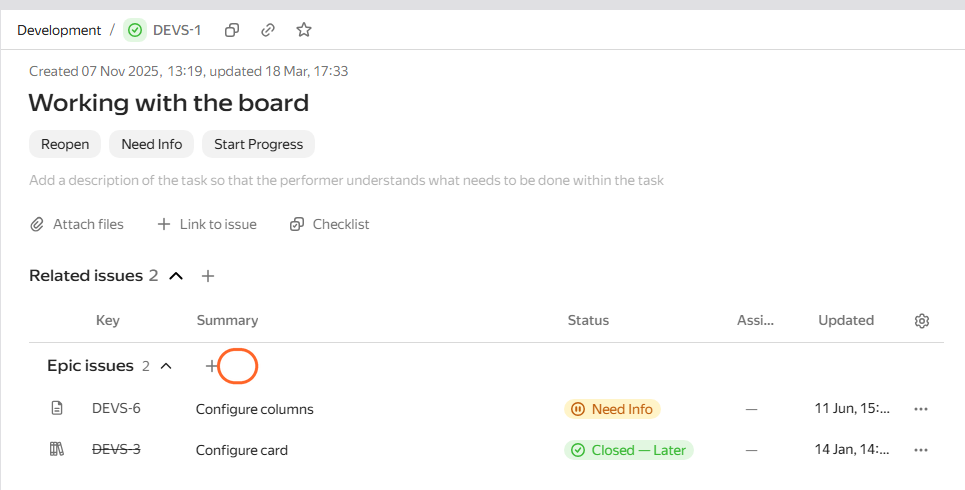
On the epic page under Epic issues, click Add.
-
Fill in the required fields and save the issue.
Removing an issue from an epic
You can remove an issue from an epic either on the issue page or on a board.
On the issue page
On the issue page, under Related issues, remove the link to the epic in the Epic section.
On the issue board
Open the board, group issues by epic, and drag the issue card to No epic.
Grouping issues by epic
You can group issues by epic on your board, in issue filters, or on the queue page:
- Click in the upper-right corner of the list or the issue board.
- In the list of options, select Epic.
Filtering issues by epic
You can also filter issues in a queue or on the issue page using the query language:
-
Click Query language in the upper-right corner. All the current search parameters that were set using quick filters and conditions will be shown in the query string.
-
Add the filtering conditions by epic to the string, For example:
-
Show all issues that have an epic:
epic: notEmpty() -
Show all issues from the epic with the
EPIC-1key:epic: "EPIC-1"
-