Configure notifications from Tracker
Tracker comes with default notifications already configured. Most of them are sent to email only, and the most important ones are duplicated in push notifications on your phone and to the Notifications section in the Tracker interface. They help you not to miss important events: when you're invited to comment, assigned as an assignee, or an issue you're following is changed.
If you get too many messages, disable the ones you don't need. If you're missing important alerts, configure them to your liking: edit an existing subscription or create a new one.
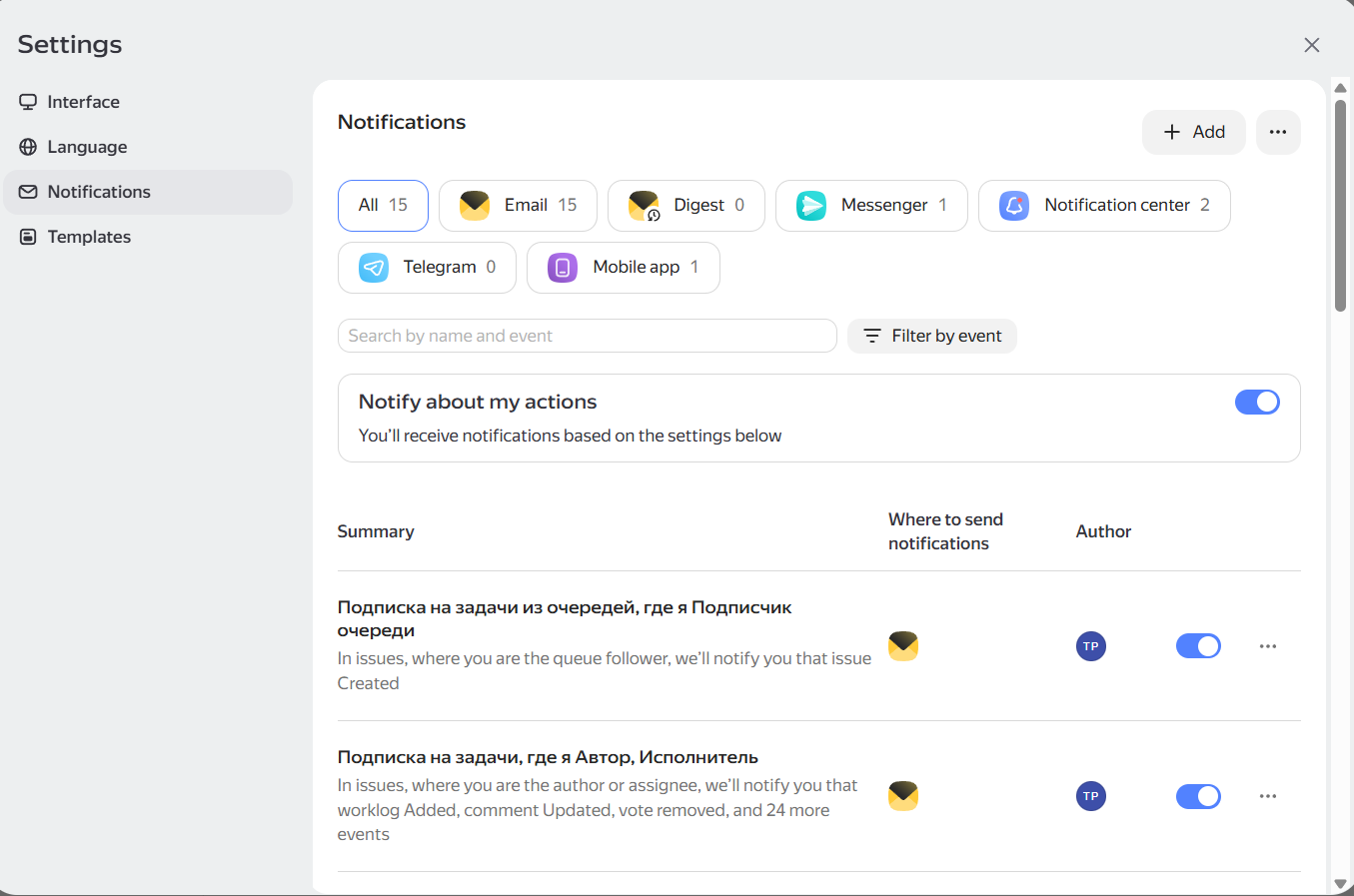
Notifications section
Where notifications can be sent
- Notification center — a section in the Tracker interface.
- Email — messages to your work email.
- Messenger or Telegram — messages from the Tracker bot.
- Mobile app — push notifications on your phone.
- Browser — push notifications in the browser. Enable browser notifications
- Digest — an email with a scheduled report on changes.
What you can configure
Each set of settings is called a subscription. In a subscription, you can choose:
- what objects to report on: issues, projects or portfolios, goals, reports;
- what events to track: comments, status changes, deadlines, and other changes;
- where to send notifications.
For example, you can send invitations to Messenger, deadlines — to the mobile app, and changes in followed issues — to a digest.
For details on configuring subscriptions, see How to set up subscriptions.