Objects from external sources
For information on working with objects from external sources in the new editor, see Embedded object.
Dynamic blocks are fully compatible with dynamic tables and any pages created in the legacy editor.
You can no longer create pages using the old editor. However, you can easily convert any existing pages from the legacy editor to the new editor format. For more information, see Switching a page to the new editor format.
You can use the iframe block to embed other pages, objects, audio files, or video clips from external sources, such as YouTube, Vimeo, and Coub.
Triggering the block
{{iframe src="http://<page_address>" width=700px height=600px frameborder=0 scrolling=no}}
Block parameters
| Parameter | Description |
|---|---|
src |
This is a required parameter. Contains the address of the object. |
width |
Indicates the iframe width in pixels or as a percentage of page width. |
height |
Indicates the iframe height in pixels. |
frameborder |
Indicates whether the iframe has a border. |
scrolling |
Indicates whether the iframe has scrollbars. |
allowfullscreen |
Enables full-screen for the iframe. Always true. |
Allowed domains
The iFrame element can contain only addresses that belong to the supported domains. The Wiki administrator can extend the list: you can learn how to do this below.
List of supported domains
-
yandex.ruyandex.rusubdomains:-
mc.yandex.ru -
disk.yandex.ru -
cloud.yandex.ru -
docviewer.yandex.ru -
docviewer.dst.yandex.ru -
forms.yandex.ru -
connect.yandex.ru
-
-
yandex.ua -
yandex.kz -
yandex.by -
yandex.netsubdomains:-
storage.yandex.net -
mds.yandex.net -
mdst.yandex.net
-
-
datalens.yandex -
yastat.net -
youtube.com -
youtube-nocookie.com -
rutube.ru -
vimeo.com -
player.vimeo.com -
player.vimple.ru -
vkontakte.ru -
vk.com -
coub.com
Expanding the list of allowed domains
The Wiki administrator can add up to 10 domains of their choice to the list of those already allowed by default.
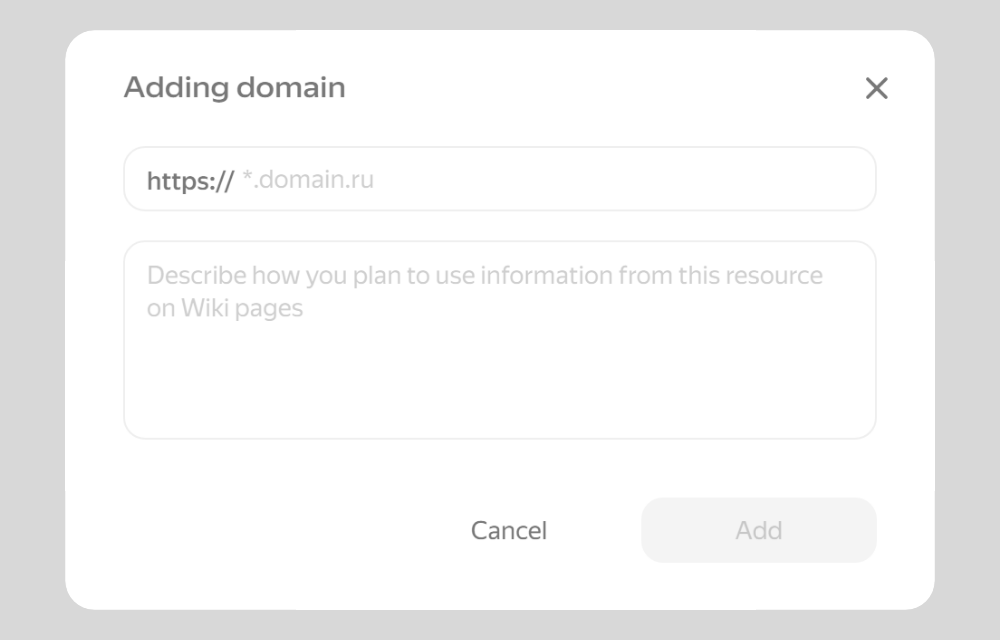
How to add a domain
- In the left panel, click Administration.
- Go to Allowed domains.
- If there are no allowed domains yet, click Add domain in the center of the screen.
To add another domain, click Add at the bottom of the list. - Enter the site domain without the protocol, for example
example.com.
If the site has subdomains (ru.example.comoren.example.com) and all of them should be included in the list of allowed domains, add the*character at the beginning of the domain name, for example*.example.com. - Add a comment about how you plan to use the information from this resource on wiki pages. Other Wiki administrators will see this comment.
- Click Add.
Now you can use content from these sites in the «iframe» block on wiki pages.
To remove a domain from the list, click to the right of it and confirm the action.
If the page does not display, then the domain prohibits embedding.
Adding a video or audio
To embed a video or audio to the page, use the {{iframe}} dynamic block. It allows you to embed media from external sources, such as Yandex Music, Vimeo, and YouTube.
-
Open the page and click Edit.
-
Embed the code of the dynamic block with a media link on the page. Use a link for embedding on external resources. These links are usually referred to as the "Embed code" or "HTML code".
-
To embed a YouTube video, use a link that looks like this:
https://www.youtube.com/embed/oCRQj_zyPjkTo obtain this link, select Share → Embed under the YouTube video and copy the
srcparameter value. -
To embed a soundtrack from Yandex Music, use a link that looks like this:
https://music.yandex.ru/iframe/#track/71263/419460To obtain this link, select Share → HTML code in the soundtrack menu and copy the
srcparameter value.
Example of a dynamic block with a video:
{{iframe src="https://player.vimeo.com/video/207028770" width="640" height="300" frameborder="0" allow="autoplay; fullscreen" allowfullscreen}}
Example of a dynamic block with a soundtrack:
{{iframe frameborder="0" style="border:none;width:100%;height:180px;" width="100%" height="180" src="https://music.yandex.ru/iframe/#track/71263/419460"}}