Enabling a sales boost and setting bids
The method is available for models: FBY, FBS, Express and DBS.
Not yet available for Market Yandex Go sellers.
If you are using an API Key token, one of the accesses in the list is required to call the method
- pricing — Manage prices
- promotion — Product promotion
- all-methods — Full account management
Launches a sales boost — creates and activates a campaign, adds products to it and assigns bids on them.
Как в кабинете выглядит кампания, созданная через API
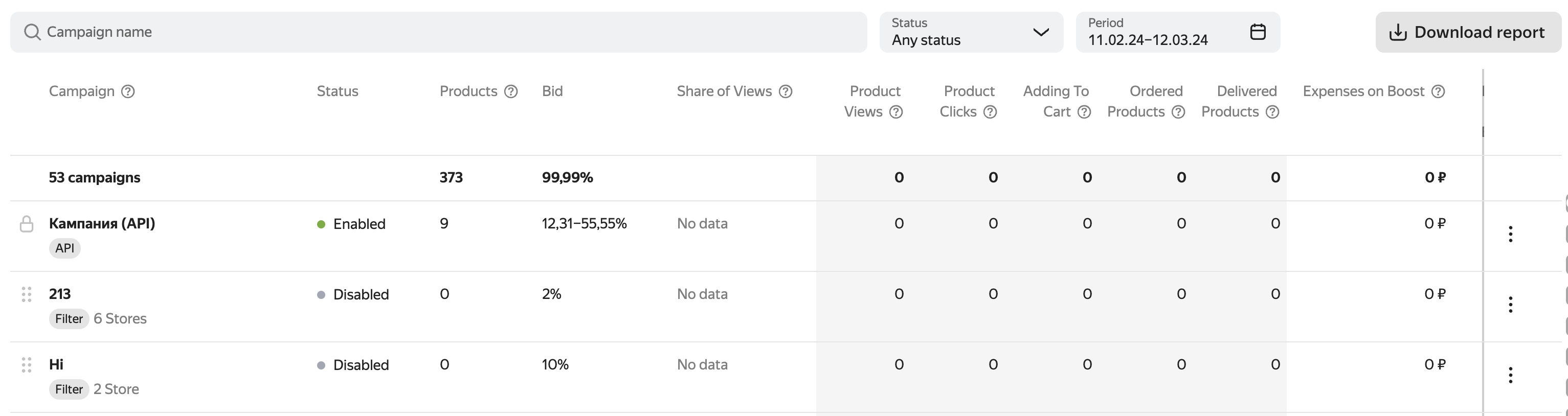
When using the query for the first time, Market: creates a single campaign for all business account stores, adds products with the specified rates to it, includes a pricing strategy for them, and launches promotion. Reusing the query will allow you to update bids on products in this campaign or add new ones. Read more about the pricing strategy in Yandex.Market Help for sellers.
If the product with the specified SKU no, it will be ignored. If there is a product in the catalog in the future with this SKU it will be automatically added to the campaign with the specified bid.
The request always works with the same campaign created via the API. If you delete it in your account, the Market will create a new one the next time you make a request. You will not be able to manage other campaigns via the API. A campaign created through the API always has the highest priority over the others. — it cannot be changed.
Query execution includes the campaign and pricing strategy, if they have been disabled.
You can make other changes to the campaign created via the API in the dashboard:
- disable or enable the campaign.
- change its name;
- disable or enable the pricing strategy.
To stop the promotion of individual products and remove them from the campaign, pass a zero bid for them in the parameter bid.
Read more about how the sales boost works in Yandex.Market Help for sellers.
You can find out the cost of a sales boost by making a request POST v2/campaigns/{campaignId}/stats/orders. The amount is contained in the field bidFee.
Данные обновляются не мгновенно
It takes up to a few minutes.
⚙️ Limit without subscription: 500 requests per minute ⭐️ Limit with Medium subscription: 1 000 requests per minute |
|---|
Request
PUT
https://api.partner.market.yandex.ru/v2/businesses/{businessId}/bids
Path parameters
|
Name |
Description |
|
businessId |
Type: integer Cabinet ID. To find out, use the request GET v2/campaigns. ℹ️ What is a cabinet and a store on the Market? Min value: |
Body
application/json
{
  "bids": [
    {
      "sku": "example",
      "bid": 570
    }
  ]
}
|
Name |
Description |
||||
|
bids |
Type: object[]
A list of products and the bids to be placed on them for promotion. Min items: Max items: Example |
Responses
200 OK
Everything worked out: the bids were set or updated. If necessary, new products have been added and a campaign has been launched.
Body
application/json
{
  "status": "OK"
}
Type: object
All of 1 type
-
Type: object
status
Type: string
The type of response. Possible values:
OK— There are no errors.ERROR— an error occurred while processing the request.
Enum:
OK,ERRORThe standard wrapper for server responses.
Example
{
  "status": "OK"
}
400 Bad Request
The request contains incorrect data. More information about the error
Body
application/json
{
  "status": "OK",
  "errors": [
    {
      "code": "example",
      "message": "example"
    }
  ]
}
Type: object
All of 1 type
-
Type: object
All of 2 types
-
Type: object
status
Type: string
The type of response. Possible values:
OK— There are no errors.ERROR— an error occurred while processing the request.
Enum:
OK,ERRORThe standard wrapper for server responses.
Example
{ "status": "OK" } -
Type: object
errors
Type: object[]
code
Type: string
The error code.
Example:
examplemessage
Type: string
Description of the error.
Example:
exampleA list of errors.
Min items:
1Example
[
  {
    "code": "example",
    "message": "example"
  }
]
Example
{
  "errors": [
    {
      "code": "example",
      "message": "example"
    }
  ]
}
A standard wrapper for server errors.
Example
{ "status": "OK", "errors": [ { "code": "example", "message": "example" } ] } -
401 Unauthorized
The authorization data is not specified in the request. More information about the error
Body
application/json
{
  "status": "OK",
  "errors": [
    {
      "code": "example",
      "message": "example"
    }
  ]
}
Type: object
All of 1 type
-
Type: object
All of 2 types
-
Type: object
status
Type: string
The type of response. Possible values:
OK— There are no errors.ERROR— an error occurred while processing the request.
Enum:
OK,ERRORThe standard wrapper for server responses.
Example
{ "status": "OK" } -
Type: object
errors
Type: object[]
code
Type: string
The error code.
Example:
examplemessage
Type: string
Description of the error.
Example:
exampleA list of errors.
Min items:
1Example
[
  {
    "code": "example",
    "message": "example"
  }
]
Example
{
  "errors": [
    {
      "code": "example",
      "message": "example"
    }
  ]
}
A standard wrapper for server errors.
Example
{ "status": "OK", "errors": [ { "code": "example", "message": "example" } ] } -
403 Forbidden
The authorization data is incorrect or access to the resource is prohibited. More information about the error
Body
application/json
{
  "status": "OK",
  "errors": [
    {
      "code": "example",
      "message": "example"
    }
  ]
}
Type: object
All of 1 type
-
Type: object
All of 2 types
-
Type: object
status
Type: string
The type of response. Possible values:
OK— There are no errors.ERROR— an error occurred while processing the request.
Enum:
OK,ERRORThe standard wrapper for server responses.
Example
{ "status": "OK" } -
Type: object
errors
Type: object[]
code
Type: string
The error code.
Example:
examplemessage
Type: string
Description of the error.
Example:
exampleA list of errors.
Min items:
1Example
[
  {
    "code": "example",
    "message": "example"
  }
]
Example
{
  "errors": [
    {
      "code": "example",
      "message": "example"
    }
  ]
}
A standard wrapper for server errors.
Example
{ "status": "OK", "errors": [ { "code": "example", "message": "example" } ] } -
404 Not Found
The requested resource was not found. More information about the error
Body
application/json
{
  "status": "OK",
  "errors": [
    {
      "code": "example",
      "message": "example"
    }
  ]
}
Type: object
All of 1 type
-
Type: object
All of 2 types
-
Type: object
status
Type: string
The type of response. Possible values:
OK— There are no errors.ERROR— an error occurred while processing the request.
Enum:
OK,ERRORThe standard wrapper for server responses.
Example
{ "status": "OK" } -
Type: object
errors
Type: object[]
code
Type: string
The error code.
Example:
examplemessage
Type: string
Description of the error.
Example:
exampleA list of errors.
Min items:
1Example
[
  {
    "code": "example",
    "message": "example"
  }
]
Example
{
  "errors": [
    {
      "code": "example",
      "message": "example"
    }
  ]
}
A standard wrapper for server errors.
Example
{ "status": "OK", "errors": [ { "code": "example", "message": "example" } ] } -
420 Method Failure
The resource access limit has been exceeded. More information about the error
Body
application/json
{
  "status": "OK",
  "errors": [
    {
      "code": "example",
      "message": "example"
    }
  ]
}
Type: object
All of 1 type
-
Type: object
All of 2 types
-
Type: object
status
Type: string
The type of response. Possible values:
OK— There are no errors.ERROR— an error occurred while processing the request.
Enum:
OK,ERRORThe standard wrapper for server responses.
Example
{ "status": "OK" } -
Type: object
errors
Type: object[]
code
Type: string
The error code.
Example:
examplemessage
Type: string
Description of the error.
Example:
exampleA list of errors.
Min items:
1Example
[
  {
    "code": "example",
    "message": "example"
  }
]
Example
{
  "errors": [
    {
      "code": "example",
      "message": "example"
    }
  ]
}
A standard wrapper for server errors.
Example
{ "status": "OK", "errors": [ { "code": "example", "message": "example" } ] } -
500 Internal Server Error
Internal error of the Market. More information about the error
Body
application/json
{
  "status": "OK",
  "errors": [
    {
      "code": "example",
      "message": "example"
    }
  ]
}
Type: object
All of 1 type
-
Type: object
All of 2 types
-
Type: object
status
Type: string
The type of response. Possible values:
OK— There are no errors.ERROR— an error occurred while processing the request.
Enum:
OK,ERRORThe standard wrapper for server responses.
Example
{ "status": "OK" } -
Type: object
errors
Type: object[]
code
Type: string
The error code.
Example:
examplemessage
Type: string
Description of the error.
Example:
exampleA list of errors.
Min items:
1Example
[
  {
    "code": "example",
    "message": "example"
  }
]
Example
{
  "errors": [
    {
      "code": "example",
      "message": "example"
    }
  ]
}
A standard wrapper for server errors.
Example
{ "status": "OK", "errors": [ { "code": "example", "message": "example" } ] } -