Adfox code forwarding
Description
With Adfox code forwarding, you can install the Adfox ad tag in the banner or the default banner. The tag (code) will be executed on the page without re-initiating the context.js library, which significantly reduces the time before the banner is displayed.
Format features:
- Viewability check works for the banner that will eventually be displayed on the site.
- Click statistics for the Adfox code forwarding [context] banner aren't taken into account.
We recommend using the Code forwarding template to forward HTML5 code or embed codes of third-party systems.
Adfox tag requirements
-
The original view of the ad code:
<!--In the site <head>, add the loader code once--> <script>window.yaContextCb = window.yaContextCb || []</script> <script src="https://yandex.ru/ads/system/context.js" async></script> <!--Adfox START--> <div id="adfox_149487961538858600"></div> <script> window.yaContextCb.push(()=>{ Ya.adfoxCode.create({ ownerId: 168627, containerId: 'adfox_149487961538858600', params:{ p1: 'bwfgn', p2: 'ekwx', pfc: 'bmtev', pfb: 'eokcn' } }) }) </script> -
Copy the embed code parameters inside the parentheses in the form of an object. For example:
{
    ownerId: 168627,
    containerId: 'adfox_149487961538858600',
    params:{
        p1: 'bwfgn',
        p2: 'ekwx',
        pfc: 'bmtev',
        pfb: 'eokcn'
    }
}
Object properties can include:
ownerId,params,customDomain.If no property is specified, the property from the embed code object of the previous request is used.
Add a banner
To add a banner with the Adfox tag, use the Adfox code forwarding [context] template. If this template is missing from the banner type list, add it from the preset.
When adding a banner, specify the parameters:
-
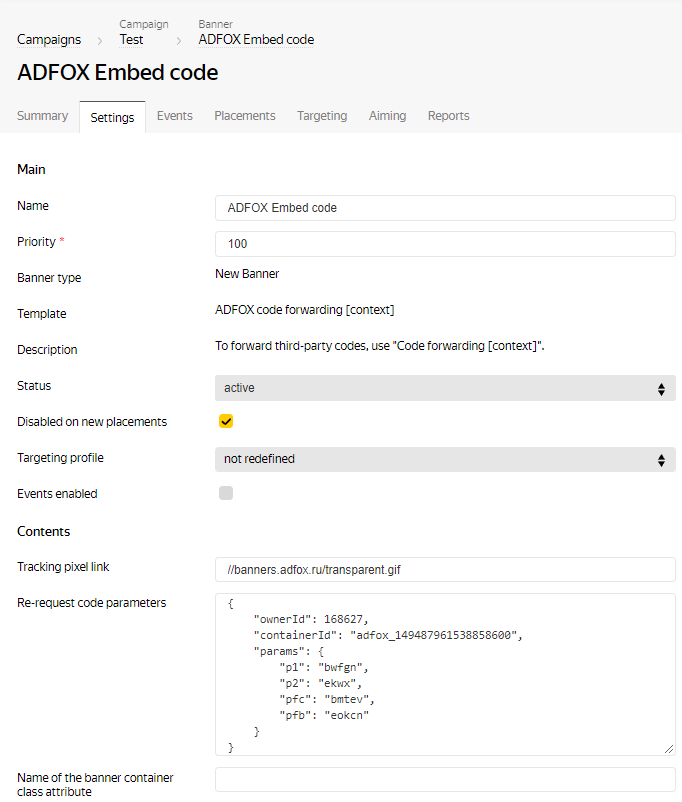
Tracking pixel link: Adfox pixel is used by default
//banners.adfox.ru/transparent.gif. If you need to keep track of impressions in an external system, delete the Adfox pixel and specify another link. -
Re-request code parameters: Insert the Adfox ad tag parameters.
Please note that when the banner is saved, the parameters of the re-request code will be wrapped in quotation marks in a special way. That is necessary for the code to work properly. Don't change the resulting code after saving the banner.
-
Name of the banner container class attribute: If necessary, enter a name (or multiple names separated by a space) for the
classattribute of the banner container.
Example of placing a banner with the Adfox ad tag:
Note
Ad labeling must be performed by the ad tag being forwarded.
Add a default banner
- To add a default banner with the Adfox code, use the code generator.
- Select the code type that you place in the default banner.
- Add tracking pixels if necessary.
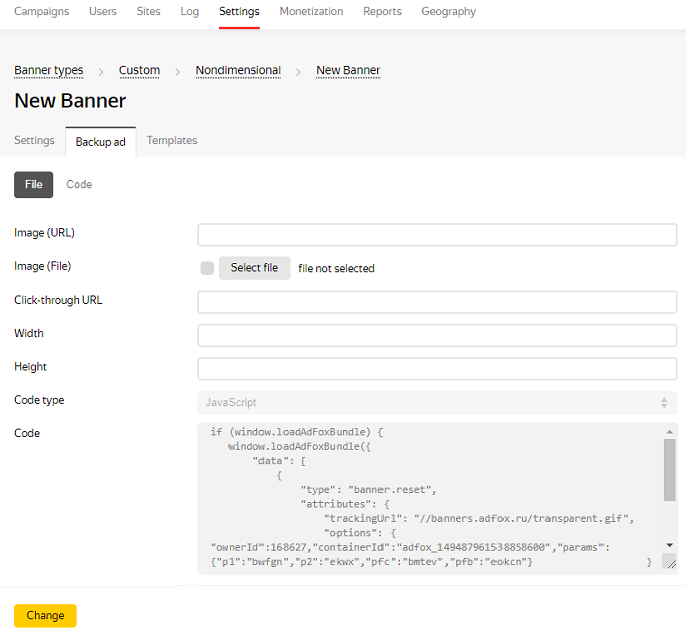
- Copy the ad tag and paste it in the Code field with the JavaScript type.
Example of placing a backup ad with the Adfox ad tag: