Forecast analysis
You can create a campaign forecast in one of the following ways:
-
On the Campaigns → Commercial tab, click the line with the desired campaign from the list.
-
In the campaign settings, go to Forecast.
-
When editing a campaign.
The window that opens may contain the following additional data:
-
General campaign parameters.
-
List of contending campaigns (when creating a forecast for a campaign that overlaps with other campaigns).
-
List of targetings and limits that affect the campaign's progress.
Forecast results
The forecast results are presented as two diagrams:
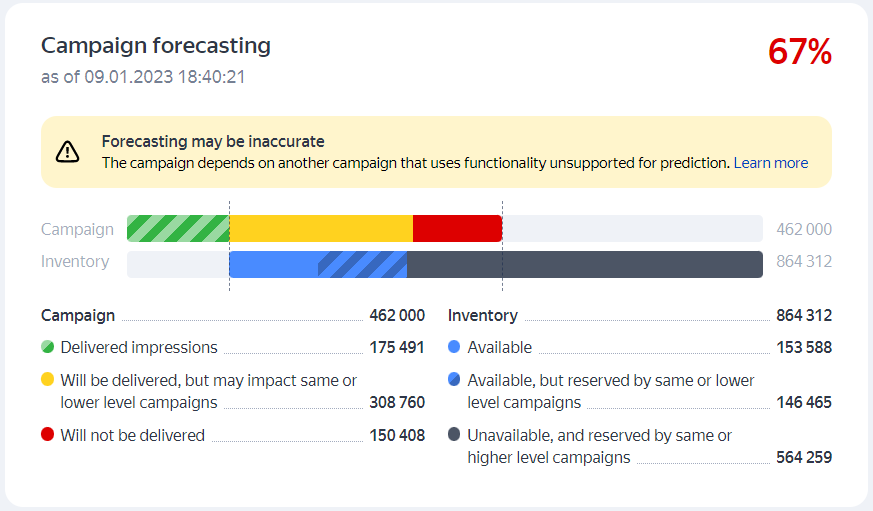
The Campaign line shows the actual and forecast numbers of impressions from the start date to the end date of the campaign (or for the next 30 days):
|
Campaign |
The number of campaign impressions completed by the time the forecast is made. |
|
Delivered impressions |
The number of impressions that will be completed within the campaign in accordance with the specified limits, targetings, and placement — without affecting other campaigns. |
|
Will be delivered, but may impact same or lower level campaigns |
The number of campaign impressions that will be completed, but may take away impressions from other campaigns (of the same level or lower) that use this inventory. |
|
Will not be delivered |
The number of campaign impressions that may not be completed. Possible reasons for non-completion: placing campaigns of the same level or higher on the inventory, limiting the frequency of impressions and the campaign progress speed, insufficient traffic on the inventory. |
The Inventory line shows the predicted total traffic on resources where this campaign runs, taking into account the campaign parameters, targetings, and placements:
|
Available |
The amount of free inventory. |
|
Available, but reserved by same or lower level campaigns |
The amount of inventory occupied by campaigns of the same level or lower. |
|
Unavailable, and reserved by same or higher level campaigns |
The amount of inventory occupied by campaigns of the same level or higher. |
|
No inventory available |
There is no traffic matching the campaign parameters. |
The campaign is likely to be completed if:
-
There are no other campaigns that use the same inventory during the specified period and have an impact on the campaign for which the forecast is being made.
-
There is enough inventory that meets the limits and targetings of the campaign. If the number of impressions set in the campaign parameters is more than the traffic on the inventory, or the impression conditions are too strict, the campaign may not be completed.
The forecast may also contain:
-
A warning about forecast inaccuracy and the reasons for it.
-
Notifications about the forecast period.
-
A list of contending campaigns that use the same inventory, and either affect completion of the forecasted campaign or are affected by it.
-
The campaign's limits and targetings, that narrow the range of available inventory and directly affect campaign completion.
My campaign won't be completed, what do I do?
If other campaigns or the campaign's own limits and targetings are hindering completion, try changing the parameters of the forecasted campaign or other campaigns using the same inventory.
Based on the forecast, you can evaluate how the new settings will affect campaign completion before actually applying them.
-
Exclude another campaign, limit, or targeting from the forecast. To do this, clear the
 checkbox next to the corresponding line in the campaign or targeting lists.
Note
Excluding a campaign, targeting, or limit from the forecast doesn't affect the settings of other campaigns or the campaign for which you're making the forecast.
-
Click Update. The forecast will be remade, and the lines with excluded campaigns or targetings will turn gray (meaning they are not included in the forecast).
-
Analyze the new forecast:
-
Has the range of inventory available for the forecasted campaign expanded?
-
How has the list of contending campaigns changed?
-
What are your obligations for serving impressions under other campaigns? Can another campaign be completely disabled or its number of scheduled impressions reduced?
-
Can the limits and targetings that take away possible impressions be disablled or adjusted?
-
-
Depending on the new forecast, apply the new settings or tweak them further to ensure that the traffic is optimally split between the campaigns.
Tip
Apart from changing campaign parameters, you can also increase your inventory by adding new placements.
Forecast examples
The campaign will be completed
Comments
- The campaign will be completed: it does not overlap with other campaigns, and there is enough inventory to complete impressions in accordance with the specified limits and targetings.
Recommendations
- No additional action is required.
The campaign will be completed, but may affect other campaigns
Comments
- The campaign will be completed, but overlaps on the inventory with other campaigns of the same level or lower.
Recommendations
- Check the list of contending campaigns and make a separate forecast for them to see how the current campaign will affect their completion.
Not enough traffic to complete the campaign due to contending campaigns
Comments
- The campaign will not be completed because it overlaps with other higher-level campaigns (their impressions are a higher priority).
Recommendations
-
To find out how many impressions are taken away by higher-level campaigns, view the list of campaigns that use the same inventory.
We recommend changing the parameters of this campaign or its contending campaigns to increase the inventory. After changing the parameters, make the forecast again.
Not enough traffic due to targeting settings
Comments
-
The campaign will not be completed for several reasons:
- It overlaps with other higher-level campaigns.
- There is not enough inventory due to strict display conditions (set targetings).
Recommendations
-
To find out how many impressions are taken away by higher-level campaigns, view the list of campaigns that use the same inventory and evaluate how many impressions you're potentially losing because of your targeting settings.
We recommend changing the parameters and targetings of this campaign or its contending campaigns to increase the inventory. After changing the settings, make the forecast again.
Not enough traffic due to limits in campaign parameters
Comments
-
The campaign will not be completed for several reasons:
- It overlaps with other higher-level campaigns.
- There is not enough inventory due to campaign limits: frequency of impressions, maximum number of impressions to a visitor, daily or hourly limits.
Recommendations
-
To find out how many impressions are taken away by higher-level campaigns, view the list of campaigns that use the same inventory and evaluate how many impressions you're potentially losing because of campaign/supercampaign limits.
We recommend changing the parameters and targetings of this campaign or its contending campaigns to increase the inventory. After changing the settings, make the forecast again.