Assistant
An assistant is a user who helps the administrator. The assistant can access campaign reports and widgets and manage their own campaigns.
Assistants are created by the account administrator.
Creating an account
-
In the main menu, open the tab Users → Assistant and click + Add.
-
The account creation page opens. Fill out the required fields.
-
Account
Come up with a login. You can only use Latin letters, digits, dashes, underscores, and periods. The login must contain between 1 and 32 characters.
The login must be unique within the Adfox system. If you enter a login that's already taken, a warning appears.
-
E-mail
Specify an email address for registration. This address will receive an invitation to the Adfox interface. You register via Yandex ID.
You can fill out the Contact information and Settings sections after creating the account.
-
-
Click Add.
The assistant has been created. An email with a registration link is sent to the specified email address.
Setting up access rights
Assistants can perform various tasks. You can customize the levels of assistant's access to objects. To do this:
-
Go to the Users → Assistant tab and click Parameters next to the account.
-
The tab with settings opens. In the Settings section, select the required options:
Option
Description
Create assigned campaigns
Assistants can create their own campaigns.
Manage additional managers
Assistants can add advertisers and assistants to campaigns.
Own advertisers
The assistant can create advertisers.
All advertisers
The assistant has access to all of the advertisers on the account.
Assigned advertisers
Assistants can access specific advertisers on the account. The list of advertisers is set up by the administrator.
Placement Profile
The assistant can place campaigns only with a certain profile.
Targeting profile
The assistant can only place campaigns that have targeting profiles previously created by the administrator. To completely disable editing targetings for the assistant, we recommend that you disable their access to targetings.
Manage all campaigns
The assistant has access to the parameters of all campaigns available in the account.
View all campaigns
The assistant can track status of all campaigns in the account, but can't edit them.
Manage assigned campaigns
The assistant can only manage campaigns assigned by the administrator. Add the assistant account to the parameters of such campaigns.
If Create assigned campaigns is disabled for the assistant, they can't add and copy campaigns and banners in the assigned campaigns.
View assigned campaigns
Monitoring the status of only the campaigns assigned by the administrator. The assistant doesn't have edit rights.
Work only with paused campaigns
The assistant can only manage campaigns with the Paused status. They can't view campaigns with other statuses.
HB configurator
Access to the tab with the script settings to connect Header Bidding.
Manage all sites
Access to the Inventory tab. The assistant can edit the settings for sites, sections, and placements.
View all sites
Access to the Inventory tab. The assistant can view the settings and statistics for sites, sections, and placements, The assistant doesn't have edit rights.
Manage sites of placement profile
Access to the Inventory tab. The assistant can edit the settings for sites, sections, and placements allowed in the assistant's placement profile.
In tags and reports, the assistant can only view data for campaigns owned by them (if managing or viewing all campaigns is allowed, then for all campaigns), and only within the scope of the placement profile.
View sites of placement profile
Access to the Inventory tab. The assistant can view the settings and statistics of sites, sections, and placements allowed in the assistant's placement profile. The assistant doesn't have edit rights. In tags and reports, the assistant can only view data for campaigns owned by them (if managing or viewing all campaigns is allowed, then for all campaigns), and only within the scope of the placement profile.
Banner impressions are available for viewing
The assistant can view data on the number of banner responses in reports.
View general reports
The assistant can view reports available on the Reports tab and widgets based on these reports.
Hide campaign priorities
The assistant can't see the levels and priorities of all campaigns.
Access to reports
Access to standard reports and widgets based on them.
Access to underdelivery
Access to the Underdelivery tab. The assistant's campaign access rights are inherited from the campaign-level parameters:
- Manage all campaigns
- View all campaigns
- Manage assigned campaigns
- View assigned campaigns
Disable access to monetization settings
The assistant can't access the Monetization tab.
Deny access to external monetization settings (Google)
The assistant can't access the External monetization settings section on the Monetization tab. The assistant won't have access to Google monetization settings.
Disable deleting objects in the account
The assistant can't delete any objects in the account.
Access to Mobile Mediation
Access to the Mobile mediation tab. The assistant can add apps and placements.
Access to Report Builder
Permission to create and edit reports, as well as widgets based on them. The assistant can view campaign statistics and analyze their results.
Access to revenue reports
The assistant can access reports on monetization revenue.
Marking. Deny manage contracts and contractors
The assistant can't access the Marking tab with a list of contractors and contracts. The assistant can't create or edit contractors and contracts. At the same time, the assistant still has access to the labeling settings in ad campaigns and banners.
Access to editing banner types
Access to the Settings → Banner types tab. The assistant will be able to add new types of banners and change the current ones (name, enable, default banner). The assistant will also be able to add templates to the banner type.
Access to editing templates
Access to viewing template parameters and code and deleting templates.
Note
Some settings are optional for accounts and may be omitted in your list.
Learn more about automatically enabled modules
The assistant can use the Manage additional managers option to add advertisers and assistants to campaigns. If you select this option, these options are selected automatically:
- Manage assigned campaigns
- Create assigned campaigns
- View assigned campaigns
- Own advertisers
Access to placements
Assistants who have access to the Monetization tab can work with ad units of the Yandex Advertising Network that are owned by the administrator. After the assistant links their Adfox account with Yandex ID, the administrator needs to set up the assistant's access to their sites in the Yandex Advertising Network. This lets the assistant add and edit ad units on the administrator's sites. The access is configured on the Users → Assistant → Access to YAN platforms tab.
If the administrator already has some Yandex Advertising Network units linked to Adfox placements, the assistant will see these units in the Yandex Advertising Network interface, but won't be able to edit them. They also won't be able to add new blocks to those placements. To enable such options for the assistant, set up permissions for them.
Selecting banner types
Select the banner types that the assistant will be able to add to campaigns. To do this:
-
On the Users → Assistant tab, click Used banner types next to the assistant account.
-
The Banner types tab opens. Select the desired banner types and click Change.
Access to targetings
You can set up assistant's access to a specific targeting type and restrict targeting settings available to them. To go to the targeting settings, on the Users → Assistant page, click Targeting next to the assistant's account.
Depending on whether the assistant has a Targeting profile assigned, targetings available to them work differently.
| Targeting settings | Assistant access rights |
|---|---|
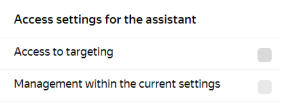 |
The assistant has no access to targeting settings. |
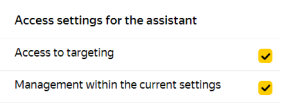 |
Partial access, the assistant can configure only the specified parameters. |
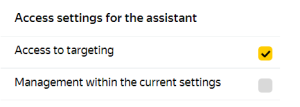 |
Full access. |
| Targeting settings | Assistant access rights |
|---|---|
|
The assistant has no access to targeting settings. The campaign is created with the targeting profile assigned to the assistant. |
|
When the assistant creates a campaign or banner, the targeting settings specified in the profile are applied. The assistant can edit settings enabled in targetings available to them. |
|
The assistant can edit targeting settings within the targeting profile. |